Calma vs Brick: Emergency Unbricks and schedules
Calma vs Brick comes down to where the exit lives. Brick is a $59 NFC device: you tap your phone on it to block apps, and you need it again to unblock, unless you spend one of five Emergency Unbricks. You get 5 in total, and they come back only when you request more after using all 5. Calma is software only, iPhone only, and runs on the clock: apps rest during the hours you choose, and the way out is a deliberate step inside the Calma app.

By AASN Tech · Last checked: · Sources at the end. · How we compare apps
In one line: Pick Brick if you want a physical key and a one-time price. Pick Calma if you want blocks that start and end on their own, with nothing to carry.
Which is better, Calma or Brick?
Pick Brick if you want a physical key and a one-time price. Pick Calma if you want blocks that start and end on their own, with nothing to carry.
The rows where the two actually differ. Checked Nov 9, 2026.
| Question | Calma | Brick |
|---|---|---|
| Price (US, as of Nov 9, 2026) | $3.99 a week, $9.99 a month or $39.99 a year | $59 once for the device. The app is free, with no subscription or recurring fees |
| Free option | 3-day free trial. Blocking needs Calma Pro | None without the device. 30-day money-back guarantee |
| How a block starts | On a schedule, when a daily limit runs out, or when you start a focus session | Tap your phone on the Brick, hold the virtual Brick in the app for 5 seconds, or a schedule. Brick Night ($129, sold separately) blocks over Bluetooth when you get into bed |
| Ending a block early | Scheduled blocks and daily limits show only Back to calm. Switch the rule off in Calma, or hold 3 seconds to end a focus session. Open limits have Open app | Tap the physical Brick again, or use 1 of 5 Emergency Unbricks. At 0 left, request more in the app (short survey) and they reset within 1 business day |
| Blocks that end on their own | Yes: schedules, daily limits (rest until midnight) and focus sessions of 15 to 180 minutes | Scheduled modes, with start and end times you set in advance. A block you start by tapping stays on until you unbrick |
| Limits | Daily time limits (15 min to 2 h) and open limits (3 to 50 opens a day) | Not publicly stated |
| Websites | Apps only. Use Screen Time for websites | Selected Safari sites from Apple's approved list |
| Account and data | No account. Rules stay on your iPhone. Privacy label: Usage Data, not linked to you | Privacy label lists email address, user ID and usage data linked to you |
| Devices | iPhone | iPhone with iOS 18 or later, and Android 12 or later with NFC. No iPad |
What is the difference between Brick and Calma?
Brick puts the off switch outside your phone. Calma keeps it inside the phone but moves it away from the block screen. Every other difference in Brick vs Calma follows from that.
With Brick, made by Brick LLC, you buy a small battery-free device, pick the apps to block, and tap your iPhone on it. The apps disappear until you tap the same Brick again. Its App Store listing says the physical tap creates “a deliberate pause between impulse and action.” The listing suggests you place the Brick somewhere out of reach, so unblocking means getting up.
With Calma (listed on the US App Store as App Blocker & Detox: Calma), there is no object. You choose apps like Instagram, TikTok or YouTube and a part of the day, like weekdays from 9 AM to 5 PM. During that window, opening Instagram shows a calm screen saying it is resting, with one Back to calm button. When the window ends, the app opens normally again, without you doing anything.
Pick Brick if you want the key to be something you can put in a drawer. Pick Calma if you want the rule to run itself.
How many Emergency Unbricks do you get on Brick?
You get 5 Emergency Unbricks on Brick. Each one unblocks all your apps without the physical device, for times when you lose your Brick or are away from home. You use one in the Brick app under Settings > Emergency UnBrick > Use Emergency UnBrick.
They don’t refill on a timer. Brick’s support page (edited October 6, 2026, checked November 9, 2026) says that once you have 0 left, you tap Request in the same place, fill out a short survey, and your Emergency Unbricks are reset within 1 business day. You can only request more once all 5 are gone. Brick’s FAQ also gives hello@getbrick.com for requests. Brick doesn’t describe any automatic weekly or monthly reset.
Calma has no count of exits to run out of. The way out is a deliberate step inside the app: switch the rule off, or hold for 3 seconds to end a focus session.
Pick Brick if five exits and a short wait feel like the right amount of strict. Pick Calma if you’d rather not keep track of how many exits you have left.
Is Brick stricter than an app blocker?
Yes, Brick is stricter than a software-only app blocker like Calma. With Brick, the only everyday way to unblock is the device itself. Its FAQ says Strict Mode is there to close loopholes, so removing the app or changing settings doesn’t end a block. The backup is five Emergency Unbricks, which unblock all apps at once.
Calma is a gentle app blocker on purpose. Scheduled blocks and daily limits have no unblock button, so the reflex tap goes nowhere. But you can still open Calma and switch the rule off, and a focus session can be ended with a 3-second hold. There is no Strict Mode.
Our view, which is reasoning and not a study: most scrolling starts as a reflex, and a pause is enough to catch it. A lockout that feels like a punishment is also easy to give up on. Brick’s answer is that the walk to the device is the pause. Both are fair bets. They suit different people.
Pick Brick if you have tried software blockers and turned every one of them off. Pick Calma if you mostly need the reflex interrupted, not a lock.
Can you skip a block in Brick? Can you skip one in Calma?
In Brick, you skip a block by tapping the device or by spending one of your 5 Emergency Unbricks. You find them in Brick’s settings under Emergency UnBrick. Brick’s support page says they are “meant for emergencies, not daily use.” When all five are gone, you request more in the same place in the app and fill out a short survey, and Brick resets them within 1 business day.
In Calma, it depends on the rule:
- Scheduled blocks and daily limits show only Back to calm. To get the app back early, open Calma and switch that rule off.
- Open limits show Open app while you still have opens left today. Each open gives you 15 minutes.
- Focus sessions stop by themselves at the time you picked. To stop one sooner, you press and hold for 3 seconds.
The real difference is the cost of leaving: a walk and a tap, or a few taps inside an app you have to open on purpose.
Pick Brick if a limited number of emergency exits reassures you. Pick Calma if a countdown of exits would stress you out.
Do Brick blocks end on their own?
Scheduled Brick blocks end without a tap. Brick’s product page says you set start and end times in advance, and its homepage lists schedules next to custom modes. Reviewers also describe using schedules for blocks that stop by themselves. A block you start by tapping stays on until you tap again, because the Brick is the key.
Brick also sells Brick Night, a separate $129 device that blocks the apps you pick over Bluetooth when you get into bed. Brick’s pages don’t say how a Brick Night block ends, so we leave that out.
That used to be different. Of the 150 most recent US App Store reviews we read (July 28 to September 26, 2026), more than ten ask Brick to bring back a timer that let a tapped block end after a set time. Reviewers say it was removed around July 2026. The listing still mentions a focus timer, but it tracks how long you stay undistracted rather than ending the block.
Calma has both kinds. Scheduled blocks start and stop at the times you set, including overnight like 10 PM to 7 AM. Daily limits rest the app until midnight. Focus sessions run from 15 to 180 minutes, with shortcuts for 25, 50 and 90, and then end by themselves.
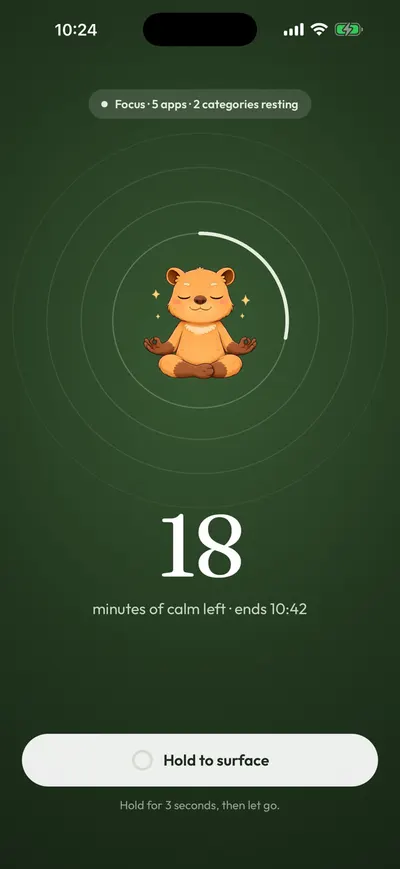
Pick Brick if you like deciding each time when you are done. Pick Calma if you want an hour-long block you don’t have to end yourself.
Which is cheaper, Calma or Brick?
Calma is cheaper for the first year, and Brick is cheaper over two years or more. As of November 9, 2026, the Brick costs $59 once, the app costs nothing, and Brick’s product page says there are no recurring fees. As of October 5, 2026, Calma Pro is $3.99 a week, $9.99 a month or $39.99 a year in the US, and eligible new subscribers get a 3-day free trial. Two years of Calma Pro ($79.98) costs more than one Brick.
Brick adds a few money perks. It has a 30-day money-back guarantee. Its FAQ says you can pay with an HSA or FSA through Truemed. And one Brick works with as many phones as you like, so a household can share one.
Calma has no free blocking: after the trial, blocking needs Calma Pro. You can cancel from Settings > [your name] > Subscriptions at any time.
Pick Brick if you want to pay once and keep it for years. Pick Calma if you’d rather not pay upfront for hardware, or want to try it for 3 days first.
What happens if you forget your Brick or travel?
If the Brick is not with you, you can still start a block. Brick’s FAQ says you hold the virtual Brick on the app’s home screen for 5 seconds. What you can’t do without the device is end the block. Your options are to go back to where the Brick is, or use an Emergency Unbrick.
That is the main trade-off of a physical key. A Brick at home works well for a school day or a gym session. It is harder on a trip, or if the Brick gets lost. Brick’s answer is to buy more than one: its product page says one phone can work with several Bricks, at home, in the car or at work.
Calma has nothing to forget, because the rules live on your iPhone. A Night Peace routine keeps running in a hotel room the same way it does at home.
Pick Brick if your days are predictable and the Brick can stay in one place. Pick Calma if you move around a lot.
Is Brick worth it?
Brick is worth it if a physical key is the thing that finally makes you stop. It has 4.9 stars from 59,943 US App Store ratings as of November 9, 2026, costs $59 once, and has a 30-day guarantee, so trying it is low risk.
It is worth less if your problem is a time of day, like bedtime or the first hour of work, and you want the block to start and stop by itself. It is also worth less if you need an iPad or a computer covered: Brick’s support page says it doesn’t support either.
Where Brick is better
- A real physical barrier. Unblocking needs the device or an Emergency Unbrick.
- Strict Mode. Per Brick’s FAQ, it closes loopholes like removing the app mid-block.
- Paid once. $59, no subscription, and one Brick can serve several phones.
- Android too, on Android 12 or later with NFC.
- Some website blocking, for selected Safari sites.
- A sleep add-on. Brick Night ($129) blocks the apps you pick over Bluetooth when you get into bed.
- Proven with users. 59,943 US App Store ratings averaging 4.9 as of November 9, 2026, and version 2026.44.0 shipped November 2, 2026.
Where Calma is better
- No object in the loop. Nothing to pack for a trip, misplace, or ration exits for.
- Blocks that start and end on their own: schedules, daily limits and focus sessions.
- More than on and off. Daily time limits and open limits per app or category.
- No account. Rules stay on your iPhone, and Calma can’t see what you do inside apps.
- A calm block screen that tells you the app is resting, with no streaks or scores.
- Cheaper in year one, at $39.99.
Can you use Calma and Brick together?
Yes, both can sit on the same iPhone, but give each app to only one of them. If Brick and Calma both block Instagram, switching off the Calma rule won’t open Instagram while a Brick mode still blocks it, and the reverse is also true.
If you want both, split the jobs. Use Calma for the fixed hours, like Family Dinner or Night Peace. Keep Brick for the times you want a hard stop you can’t talk yourself out of, like an exam week.
How to set up Calma if you are coming from Brick
- Unbrick with the device and turn off any Brick schedules, so nothing is still blocking when you switch.
- Install Calma, allow Screen Time access, and choose the same apps your Brick modes covered.
- Match each mode to a routine. A Sleep mode fits Night Peace (10 PM to 7 AM), a Family mode fits Family Dinner, and a Work mode fits Work Focus (weekdays, 9 AM to 5 PM).
- Replace ad hoc bricking with focus sessions. Start one from the Today screen for 25, 50 or 90 minutes.
- Keep the Brick if you like it for the days you want a stricter stop.
FAQ
Is Calma an app version of Brick?
Not quite. Calma blocks the same kind of apps, but there is no device and no tap. It runs on schedules and limits, and you can switch a rule off in the app. Brick is stricter.
Does Brick need a subscription?
No, Brick doesn’t need a subscription. Its product page says “No recurring fees. Lifetime app access included.” You pay $59 for the device and the app is free to download (checked November 9, 2026).
How many Emergency Unbricks do you get on Brick?
You get 5. Brick’s App Store listing and support page both say 5 Emergency Unbricks are included, and each one unblocks all apps without the device (checked November 9, 2026).
When do Brick’s Emergency Unbricks reset?
Brick’s Emergency Unbricks reset only when you ask, after you have used all 5. In the app you go to Settings > Emergency UnBrick, tap Request and complete a short survey, and Brick says they are reset within 1 business day (support page, checked November 9, 2026). Brick doesn’t describe an automatic reset.
Can you put Brick on a schedule?
Yes. Brick’s product page says you can set start and end times in advance, so a mode blocks your apps on its own. Brick Night, a separate $129 device, blocks the apps you pick over Bluetooth when you get into bed.
Does Brick work without the device?
Partly. You can start a block from the app by holding the virtual Brick for 5 seconds. To end it, you need the device or one of five Emergency Unbricks.
Does Brick or Calma work on iPad?
Neither. Brick’s support page says it doesn’t support iPads or computers, and Calma is iPhone only.
Should you use Calma or Brick?
- Use Brick if you want a key that lives outside your phone, a one-time price, Android support, or Strict Mode.
- Use Calma if you want set hours and daily limits that run on their own, with no device to carry and no account.
- Use both if you want calm routines most days and a hard stop now and then.
How we compared: we read Brick’s website, FAQ, support pages and App Store listing on September 28, 2026, along with its 150 most recent US App Store reviews, and checked them again on November 9, 2026. We did not test a Brick hands-on, so this page rests on what Brick publishes and what its reviewers report. Prices are dated.
For more, see our Brick alternatives, hard blockers vs a gentle pause, the list of the best app blockers for iPhone, a quiz on which app blocker fits you, or how Calma’s app blocker works.
Rather set it once than tap it every day?
Choose the apps and the hours, like weeknights from 10 PM to 7 AM, and Calma rests them on schedule. Nothing to carry. Try it free for 3 days.

Sources
- Brick homepage (Brick $59, Brick Night $129, 30-day guarantee, schedules, remote activation, one Brick for many phones), checked 2026-11-09
- Brick product page (no recurring fees, lifetime app access, battery-free, start and end times set in advance, 5 Emergency Unbricks, Strict Mode, several Bricks for one phone), checked 2026-11-09
- Brick FAQ (compatibility, what you can block, 10 modes, Strict Mode, Emergency Unbricks, request more by email, remote bricking, HSA and FSA), checked 2026-11-09
- Brick Support: What are Emergency UnBricks and how can I replenish them? (5 included, request more in the app at 0 left, reset within 1 business day; edited Oct 6, 2026), checked 2026-11-09
- Brick Support: What devices does Brick work with? (iOS 18 or later, Android 12 or later with NFC, no iPad or computer), checked 2026-11-09
- Brick on the App Store (4.9 from 59,943 US ratings, version 2026.44.0 of Nov 2, 2026, requires iOS 18.0, 5 Emergency Unbricks, privacy label), checked 2026-11-09
- Brick App Store reviews, 150 most recent US reviews (July 28 to September 26, 2026), checked 2026-09-28
- Apple Support: Cancel a subscription from Apple, checked 2026-09-28
- Calma on the App Store (Weekly $3.99, Monthly $9.99, Yearly $39.99), checked 2026-10-05