How to block YouTube on iPhone (app, Safari, Shorts)
Short answer
To block YouTube on iPhone with the built-in Screen Time, set a Time Allowance for its category in Settings > Screen Time > Time Allowances (called App Limits in iOS 26), and block youtube.com so Safari can't stand in for the app. Neither Screen Time nor Calma can block only Shorts. For that, YouTube's own Shorts feed limit goes down to zero minutes, though you can dismiss it.
We make Calma, one of the two options below. The Screen Time steps work without it.
 Free trial · Data stays on your iPhone
Option 1 · Built in
How do I block YouTube with Screen Time?
- Open Time Allowances
Head to Time Allowances inside Settings > Screen Time. Turn on App & Website Activity if Screen Time asks.
- Find YouTube's category
Tap Manage Categories, tap the add button and choose a category. Tap it to see the apps inside and check that YouTube is listed. The App Store files YouTube under Photo & Video.
- Give it a daily amount
Tap the category under Time Allowances and set the slider, like 45 minutes. The whole category shares that time.
- Put a passcode on it
In Settings > Screen Time > Manage Screen Time, tap Lock Screen Time Settings and choose a four-digit code, so changing the allowance needs it.
Can you block YouTube in Safari too?
Yes, with Screen Time. Calma blocks apps, not websites. On iOS 26, go to Settings > Screen Time > Content & Privacy Restrictions > App Store, Media, Web & Games > Web Content, choose Limit Adult Websites, and add youtube.com under Never Allow. On iOS 27, look for the same list under Content & Privacy Restrictions. Otherwise YouTube stays one browser tab away.Option 2 · On a schedule
How do I block YouTube only at night, or during work?
Block YouTube every day from 10 PM to 7 AM.
- Open the Moments tab, tap New moment
Or tap the Night Peace suggestion to start from a ready-made 10 PM to 7 AM block.
- Tap the words
Choose YouTube from Apple's picker, set the days and times.
- Tap Protect this moment
When it starts, YouTube rests. Open it and you'll see
YouTube is resting.
with one button: Back to calm.
Free trial · Data stays on your iPhoneScreen Time or Calma for YouTube?
| Question | Screen Time: Time Allowance or schedule |  Calma scheduled block Calma scheduled block |
|---|---|---|
| Best when | You want a daily time budget | A specific time is the problem: bed, work, dinner |
| What you see | A limit screen you can dismiss, unless you set a Screen Time passcode | "YouTube is resting." and one button, Back to calm |
| Cost | Free | Free to download. Calma Pro unlocks blocking, with a 3-day free trial |
When should YouTube be blocked?
Autoplay after lights out
Block YouTube every day from 10 PM to 7 AM.
One video turns into ten
Block YouTube on weekdays from 9 AM to 5 PM.
Tutorials, not rabbit holes
Allow YouTube 3 opens a day.
Which part of YouTube do you want to block?
Start here, because each part needs a different tool. The YouTube app, youtube.com in Safari and the Shorts feed are three separate problems on iPhone.
| What you want to stop | What works | What doesn’t |
|---|---|---|
| The YouTube app | A Screen Time Time Allowance or schedule, or a Calma rule | Deleting it, which a reinstall undoes |
| youtube.com in Safari | Screen Time: Never Allow list | Calma, which blocks apps only |
| Only the Shorts feed | YouTube’s Shorts feed limit, set to zero | Screen Time and Calma, which block the whole app |
| YouTube Music | Add YouTube Music to the same rule | Blocking YouTube, since Music is a separate app |
If Shorts is the whole problem and you still want long videos, try the Shorts feed limit first. It is free and targets exactly the feed. The catch is the dismiss button. If you tap past it every time, block the app at the hours you slip instead.
How do you keep YouTube for tutorials but stop the rabbit hole?
Use an open limit instead of a full block. YouTube is often useful: a repair video, a recipe, a talk you meant to watch. A total block closes all of that, and a daily timer runs out on whatever you watched first.
In Calma, “Allow YouTube 3 opens a day” leaves YouTube resting between uses. The block screen shows Open app while you have opens left. Each open unlocks YouTube for 15 minutes, enough for a short how-to video, and short enough to keep a quick look quick. When the opens are used up, the button changes to Back to calm.
To pick the number, look at YouTube’s own time watched profile. It shows how long you watched today, yesterday and over the past 7 days, along with your daily average. It only counts while you are signed in, and it leaves out YouTube Music.
How do you block YouTube during work?
Schedule it for your working hours. Calma’s Work Focus preset covers Monday to Friday, 9 AM to 5 PM, and you can change the days and times by tapping them in the rule. YouTube shows “YouTube is resting.” until the window ends, then opens normally.
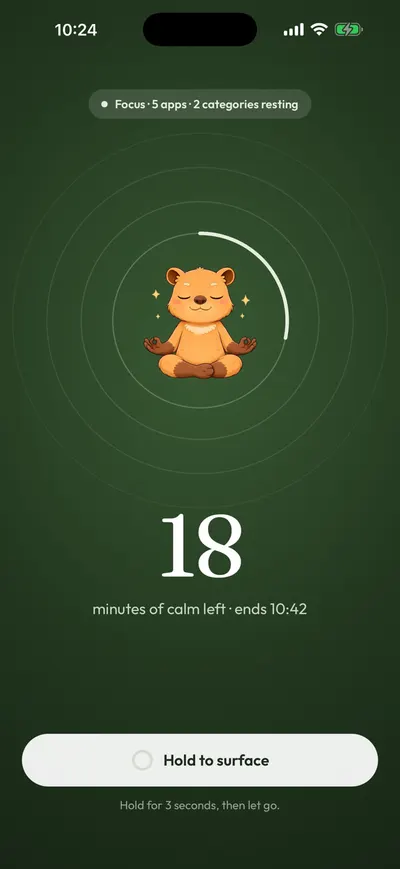
For one task rather than a whole day, start a focus session instead. Sessions run from 15 to 180 minutes, with shortcuts for 25, 50 and 90, and they end on their own. Ending one early takes a 3-second hold, so it can’t happen by accident.
On iOS 27, Screen Time can do a version of this with a Screen Time Schedule: add a weekday time window from 9 AM to 5 PM and choose which categories stay available in it, leaving YouTube’s out. Apple notes this needs iOS 27 or later on all your Apple devices. On iOS 26, Downtime does the same job.
Where to go next
The general method is in how to block distracting apps without deleting them. For the first hours of the day, see the first hour of work guide. If your evenings are the issue, the evening wind-down guide goes further. Other apps: how to block TikTok and how to block Instagram.
Does YouTube have its own time limits?
- Shorts feed limit
YouTube: You > Settings > Time management > Shorts feed limit. A daily time limit for the Shorts feed only, and it can be set to zero. When you reach it, YouTube shows a reminder that you can dismiss or ignore.
- Remind me to take a break
YouTube: Settings > General > Remind me to take a break. Pauses the video at the interval you choose until you dismiss the reminder. YouTube says the timer resets if you close the app or pause for more than 30 minutes.
- Remind me when it's bedtime
YouTube: Settings > General > Remind me when it's bedtime. A reminder between a start and end time you set. It can interrupt the video or wait until it ends, and **Remind Me Again** repeats it in 15 minutes.
- Autoplay
YouTube: Settings > Autoplay. Turn it off and the next video no longer starts on its own. YouTube says autoplay otherwise stops by itself after 4 hours on Wi-Fi, or 30 minutes of inactivity on mobile data.
Why do YouTube limits get ignored?
youtube.com plays in Safari, including Shorts. Blocking the app leaves the website open unless you block the domain too.
Every YouTube reminder has a dismiss button. The Shorts feed limit, break reminder and bedtime reminder all let you carry on.
Share links use youtu.be. Those short links redirect to youtube.com (we checked on September 24, 2026), so blocking youtube.com covers the page they land on.
YouTube Music and YouTube Kids are separate apps. Blocking YouTube doesn't block YouTube Music. Add it to the same rule if music videos are part of the problem.
Shorts are part of the YouTube app. iOS blocks apps as a whole, so an app blocker can't hide the Shorts tab and keep the rest. Only YouTube's Shorts feed limit targets Shorts.
A category allowance is shared. YouTube's Time Allowance is the allowance of its whole category, so other apps in that category spend the same minutes.
FAQ
Can I block YouTube Shorts but keep regular videos?
Only inside YouTube. Set Shorts feed limit to zero in Settings > Time management. It is a reminder you can dismiss, not a lock. Screen Time and Calma block the whole YouTube app, Shorts included.
Does blocking the YouTube app also block YouTube Music?
No. YouTube Music is its own app on the App Store. Pick both in Screen Time or in Calma's app picker if you want both closed.
How do I stop YouTube playing all night?
Turn off Autoplay in YouTube's settings, and set the bedtime reminder. For a real stop, schedule YouTube to be blocked, for example with Calma's Night Peace from 10 PM to 7 AM, or a Screen Time Schedule window that leaves YouTube's category out.
Can I block youtube.com in Safari with Calma?
No. Calma blocks apps, not websites. Use Screen Time's Content & Privacy Restrictions and add youtube.com under Never Allow. Apple's iOS 27 guide also says a Time Allowance applies to an app's own website when the app declares one.
Steps checked against Apple and YouTube documentation for iOS 27, Sep 24, 2026. Sources: Apple Support: Set Screen Time Schedules and Time Allowances (iOS 27), Apple Support: Set up Screen Time for yourself (iOS 27), Apple Support: Create, change, or remove a Screen Time passcode, Apple Support: Block apps, app downloads, websites, and purchases (iOS 26), YouTube Help: Set a Shorts feed limit, YouTube Help: Take a break reminder, YouTube Help: Set a bedtime reminder, YouTube Help: Autoplay videos, YouTube Help: Time watched profile, YouTube on the App Store (version 21.38.2, Photo & Video), YouTube Music on the App Store