How to block Snapchat on iPhone (or limit it)
Short answer
To block Snapchat on iPhone for free, set a Time Allowance for the category that holds Snapchat in Settings > Screen Time > Time Allowances (called App Limits in iOS 26), then lock it with a Screen Time passcode so the limit holds. Snapchat Support documents no daily time limit for your own account, so if you keep tapping Ignore Limit, schedule Snapchat to rest at the hours you slip, like 10 PM to 7 AM, or allow it a few opens a day with an app blocker such as Calma.
We make Calma, one of the two options below. The Screen Time steps work without it.
 Free trial · Data stays on your iPhone

Option 1 · Built in
How do I block Snapchat with Screen Time?
- Find the category Snapchat is in
Go to Settings > Screen Time > Time Allowances and tap Manage Categories. The App Store lists Snapchat under Photo & Video first (Social Networking second), so a Social Media allowance may not cover it. Tap a category to see its apps, or tap the add button to create one.
- Set a small daily amount
Back under Time Allowances, tap that category and drag the slider, for example to 30 minutes. Snapchat shares those minutes with every other app in the same category.
- Add a passcode
In Settings > Screen Time, tap Passcode & Management, then Lock Screen Time Settings, and enter a four-digit code. The passcode locks your Screen Time settings, so the limit can't be changed or turned off without it. Apple notes that, by default, Screen Time limits can be ignored once reached.
Can you block Snapchat in Safari too?
Yes, with Screen Time. Calma blocks apps, not websites. On iOS 26, go to Settings > Screen Time > Content & Privacy Restrictions > App Store, Media, Web, & Games > Web Content, choose Limit Adult Websites, and add snapchat.com and web.snapchat.com under Never Allow. Otherwise Snapchat stays one browser tab away. On iOS 27, Apple says a Time Allowance also covers a website the app declares, so open the site in Safari once your time runs out to check.Option 2 · On a schedule
How do I block Snapchat only at night, or during work?
Block Snapchat every day from 10 PM to 7 AM.
- Open the Moments tab, tap New moment
Or tap the Night Peace suggestion to start from a ready-made 10 PM to 7 AM block.
- Tap the words
Choose Snapchat from Apple's picker, set the days and times.
- Tap Protect this moment
When it starts, Snapchat rests. Open it and you'll see
Snapchat is resting.
with one button: Back to calm.
Free trial · Data stays on your iPhoneScreen Time or Calma for Snapchat?
| Question | Screen Time: Time Allowance or schedule |  Calma scheduled block |
|---|---|---|
| Best when | You want a daily time budget | A specific time is the problem: bed, work, dinner |
| What you see | A limit screen that, by default, you can ignore | "Snapchat is resting." and one button, Back to calm |
| Cost | Free | Free to download. Calma Pro unlocks blocking, with a 3-day free trial |
When should Snapchat be blocked?
One more Snap before sleep
Block Snapchat every day from 10 PM to 7 AM.
Replying, not browsing
Allow Snapchat 5 opens a day.
Thirty minutes is plenty
Allow Snapchat 30 minutes a day.
Where can Snapchat still reach you after you block the app?
Blocking the Snapchat app leaves notifications, Streak reminders and Snapchat for Web on a computer. On iPhone, the app is the main way in, so most of the work is the app itself and the alerts that call you back to it.
| Way in | What closes it | What doesn’t |
|---|---|---|
| The Snapchat app | A Time Allowance or Screen Time Schedule, or a Calma rule | Deleting it, since your account is still there when you reinstall |
| Chat and Story notifications | Snapchat’s Notifications toggles, or Settings > Notifications > Snapchat on your iPhone | Muting one friend’s chats, which leaves Story alerts on |
| Streak reminders | Leaving Streak Reminder off in each friend’s Chat and Notification Settings | A Time Allowance |
| web.snapchat.com | Screen Time’s Never Allow list, with snapchat.com and web.snapchat.com | Calma, which blocks apps only |
| Snapchat for Web on a laptop | Limits on that computer | Anything you set on your iPhone |
The notification rows are the ones people miss. If you mostly use Snapchat to message friends, a chat or a Streak alert arrives, you open it to reply, and the Stories and Spotlight are right there. If you want to keep talking to friends, quiet the alerts you don’t need and limit opens rather than shutting Snapchat all day.
Can a Social Media limit miss Snapchat?
A Social Media limit can miss Snapchat because the App Store lists Snapchat under Photo & Video first, and on iOS 27 a Time Allowance belongs to a whole category, not one app. The allowance that stops Instagram can leave Snapchat open.
Before you set any time, tap through Manage Categories until you find the one listing Snapchat. Every app in it spends the same minutes, so a photo editor you use for work can use up Snapchat’s time. X has the same issue, for the same reason.
On iOS 26, App Limits can limit Snapchat alone: tap Add Limit, tap a category’s name, select Snapchat, tap Next and set the time. Apple notes that, by default, Screen Time limits can be ignored once they are reached. In Calma, on either version, you pick Snapchat itself from Apple’s app picker, so there is no category to figure out.
Which way to limit Snapchat fits you?
The right tool depends on whether you want a time budget, set hours, or a few quick visits a day. Here is an honest summary, including when Calma is not the pick.
| Option | Best for | Not for | Cost |
|---|---|---|---|
| Screen Time Time Allowance | A daily budget for Snapchat and similar apps | People who tap past the limit, or who want Snapchat alone on iOS 27 | Free |
| Screen Time Schedule (Downtime on iOS 26) | Closing Snapchat at fixed hours | People who don’t want to manage a passcode | Free |
| Snapchat’s own settings | Fewer pings: notification toggles, muted chats, Streak reminders off | Limiting time. Snapchat documents no time limit for your own account | Free |
| Calma | Snapchat resting at set hours, a daily limit, or a few opens a day, with a calm block screen | iPad or Mac, or a lock you cannot undo | Free to download, Calma Pro with a 3-day free trial |
| A hard blocker | A barrier you cannot switch off | People who want to stay in charge of their own rules | Varies |
If you want a lock you cannot undo, a hard blocker fits better than Calma. See Calma vs Brick and the Opal alternatives page, or the full best app blocker for iPhone list. We make Calma, so weigh that too.
How do you stop using Snapchat in bed?
To stop using Snapchat in bed, block it on a schedule instead of rationing it. Late at night, one reply turns into watching Stories, then Spotlight, and a daily limit is either spent by then or still waiting for you.
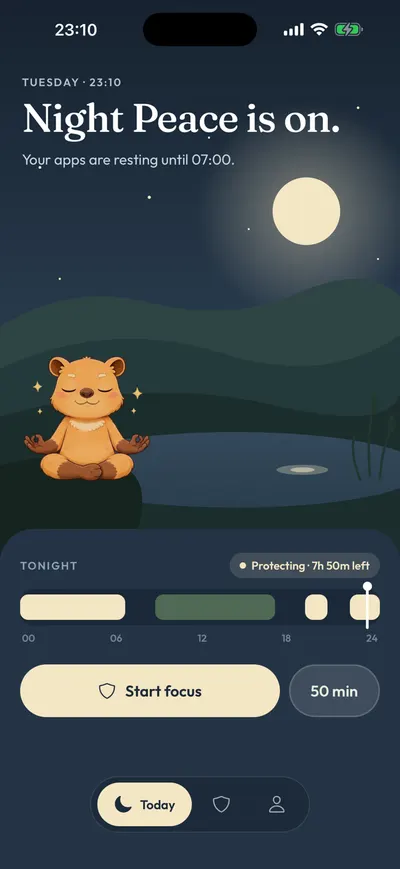
In Calma, start from Night Peace, which rests the apps you pick every day from 10 PM to 7 AM. Tap the times in the rule to change them. During those hours, opening Snapchat shows “Snapchat is resting.” and a single button, Back to calm. There is no “open anyway” on that screen. If you truly need Snapchat at 11 PM, you open Calma and switch Night Peace off.
A night block also leaves the whole day for Streaks, which Snapchat says end only when more than a day passes without a new Snap from everyone in the chat.
On iOS 27, Screen Time can do a version of this: in Screen Time Schedule, add a 10 PM to 7 AM window and leave Snapchat’s category out. Apple says this needs iOS 27 or later on all your Apple devices. On iOS 26, Downtime with Block at Downtime does the same job.
What if you only open Snapchat to reply to friends?
If you only open Snapchat to reply to friends, limit opens, not minutes. Answering a Snap is the part you want to keep. An open limit keeps that and stops the drift into Stories and Spotlight afterward.
In Calma, “Allow Snapchat 5 opens a day” keeps Snapchat resting between uses. While you have opens left, the block screen shows Open app, and each open unlocks Snapchat for 15 minutes. When the opens are used up, the button changes to Back to calm.
If you’d rather think in minutes, Social Detox gives Snapchat 30 minutes a day, and when the time runs out, Snapchat rests until midnight. Pair either one with Snapchat’s own settings so each open lands on less: turn off the notification types you don’t need, and mute the chats that ping all day.
What is Calma?
Calma is a gentle app blocker for iPhone, made by AASN Tech, a studio in São Paulo, Brazil. Calma is built on Apple’s Screen Time APIs, so iOS applies the blocks and they keep working when Calma is closed. Calma has no account and no ads, and your rules stay on your iPhone. Calma is free to download, and blocking needs Calma Pro, with a 3-day free trial. Calma is iPhone only, with no iPad, Mac or Android version. On the App Store, Calma is listed as App Blocker & Detox: Calma, and the interface is available in 12 languages.
Where to go next
If late nights are the problem, an evening wind-down routine goes further, and what doomscrolling is and why a pause helps explains the pull of an endless feed. Why you keep overriding App Limits looks at the Ignore Limit habit. To rest several apps at once, start with how to block distracting apps without deleting them, read how Calma works as an app blocker, or compare Apple’s free tools in Calma vs Screen Time. The same steps for other apps: how to block Instagram, how to block TikTok, how to block Facebook on iPhone, how to stop scrolling Reddit and keeping YouTube for tutorials only.
Does Snapchat have its own time limits?
- Notification toggles
Snapchat: profile icon > gear icon (Settings) > Notifications. Turn off each notification type you don't need, one toggle at a time. In the same menu, Manage Story Notifications picks whose Stories can notify you. Fewer pings means fewer reasons to open Snapchat. It does not limit time in the app.
- Mute Chats and Mute Calls
Snapchat: Chat screen > press and hold a friend's name > Chat and Notification Settings > Notification Settings. Turn on Mute Chats, Mute Calls or both for one friend. Useful for a busy chat that keeps pulling you back in. It does not limit time in the app.
- Streak Reminder
Snapchat: Chat feed > press and hold a friend you have a Streak with > Chat and Notification Settings > Streak Reminder. A per-friend alert you turn on yourself, for when a Streak is about to expire. Snapchat says reminders are only available for active Streaks and have to be turned on again for each new Streak. If these alerts pull you back at night, leave them off.
Why do Snapchat limits get ignored?
Snapchat for Web on a computer. Snapchat Support points people to web.snapchat.com from a computer, in Chrome, Edge or Safari. A block on your iPhone does not reach your laptop, and Calma is iPhone only.
web.snapchat.com leads to snapchat.com. We opened web.snapchat.com on October 11, 2026 and it redirected to snapchat.com/web. Snapchat Support describes the web version as a desktop feature and we have not tested it in Safari on an iPhone. To close it anyway, go to Settings > Screen Time > Content & Privacy Restrictions > App Store, Media, Web, & Games > Web Content (iOS 26), choose Limit Adult Websites, and add both addresses under Never Allow.
Streaks run on a daily clock. Snapchat says a Streak ends when more than a day passes without a new Snap from everyone in the chat, and an hourglass next to a chat means it is about to expire. An overnight block leaves the whole day free. A block longer than a day can end a Streak.
Screen Time and Calma block the whole app. You can't block Spotlight or Stories and keep chats. If you want messages to stay reachable, use an open limit or a schedule with gaps, not an all-day block.
FAQ
Does Snapchat have a screen time limit?
Not for your own account. As of October 11, 2026, we found no daily time limit or break reminder documented in Snapchat Support. Family Center lets a parent see a teen's time spent, but it does not limit it. To cap your own time, use Screen Time or an app blocker.
How do I put a time limit on Snapchat on iPhone?
On iOS 27, go to Settings > Screen Time > Time Allowances, find the category that holds Snapchat under Manage Categories, and drag its slider to the time you want. On iOS 26, go to Screen Time > App Limits > Add Limit, tap a category's name, select Snapchat, tap Next and set the time. Add a Screen Time passcode, because Apple notes that by default limits can be ignored once reached.
Will blocking Snapchat end my Streaks?
It can if the block lasts more than a day. Snapchat says a Streak expires when more than a day passes without a new Snap from everyone in the chat. A night block such as 10 PM to 7 AM leaves the day open for Snaps. If a Streak does expire, Snapchat says to look for a Restore button next to that chat. Only recently expired Streaks can be restored, and if there is no button, it can't be.
How do I block Snapchat at night?
Schedule it. On iOS 27, open Settings > Screen Time > Screen Time Schedule, turn on Schedule, add a time window like 10 PM to 7 AM and leave Snapchat's category out of it. On iOS 26, use Downtime and turn on Block at Downtime (it needs a Screen Time passcode). In Calma, Night Peace covers 10 PM to 7 AM and shows only Back to calm until morning.
How much does Calma cost?
Calma is free to download, and blocking needs a Calma Pro subscription with a 3-day free trial for eligible new users. As of October 11, 2026, the US App Store lists Calma Pro at $3.99 a week, $9.99 a month or $39.99 a year. Screen Time is free and built into every iPhone.
Steps checked against Apple and Snapchat documentation for iOS 27, Oct 11, 2026. Sources: Apple Support: Set Screen Time Schedules and Time Allowances (iOS 27), Apple Support: Set schedules with Screen Time on iPhone (iOS 26), Apple Support: Block apps, app downloads, websites, and purchases (iOS 26), Apple Support: Create, change, or remove a Screen Time passcode, Snapchat Support: How do I control my Snapchat notifications on iOS?, Snapchat Support: How do I turn off message or call notifications from someone on Snapchat?, Snapchat Support: How do Streaks work and when do they expire?, Snapchat Support: How do I set reminders for my Streaks?, Snapchat Support: I lost my Streak. How do I restore it?, Snapchat Support: How to Call, Snap, and Chat from Snapchat for Web, Snapchat Support: How do I see how my teen spends their time on Snapchat?, Snapchat on the App Store (version 14.27.0.54, Photo & Video), Calma on the App Store (prices and trial)
Also: Block FacebookBlock InstagramBlock RedditBlock TikTokBlock XBlock YouTube