6 Clearspace alternatives for iPhone in 2026
The best Clearspace alternatives for iPhone are Calma (our app) if you want apps blocked at set times with no streaks or challenges, one sec if you want a similar pause backed by published research, ScreenZen if you want it free, Jomo if you want to choose how hard each unlock is, Opal if you want a strict mode, and Screen Time if you'd rather install nothing. If push-ups before TikTok are what keep you off it, Clearspace may still be your best pick.

By AASN Tech · Last verified: · Sources at the end. · How we compare apps
 Free trial · Data stays on your iPhone
In one line: Stay with Clearspace if exercise-to-scroll and a partner keep you honest. Switch if you want more than one app for free, a cheaper pause, or blocks tied to the clock.
Clearspace alternatives compared
Same fields we use on every comparison page. US prices as of Sep 28, 2026.
| Feature | Clearspace | Calma | Jomo | one sec | Opal | Screen Time | ScreenZen |
|---|---|---|---|---|---|---|---|
| Price | $6.99/mo or $44.99/yr | $3.99/wk, $9.99/mo or $39.99/yr | $5.99/mo, $29.99/yr or $99.99 once | $6.99/mo, $19.99/yr or $99.99 lifetime | $19.99/mo or $99.99/yr | Free | Free, optional tips $5 to $40 |
| Free tier | One app, per Clearspace's launch page | 3-day free trial, then Calma Pro | 1 Session and 1 Action or Limit | One app | 1 rule, one-off sessions, today's Opal Score | Everything | Everything |
| Blocking style | Breath or exercise before the app opens, then a timed session | Calm block screen at set times | Blocks at set times, after a limit, or until you act | Breathing pause before the app opens | Sessions with three strictness levels | Time Allowances and a Screen Time Schedule (App Limits and Downtime in iOS 26) | Wait before opening, can grow each time |
| Can you end a block early? | Proceed after the pause, or opt out. The session ends when your chosen time runs out | Scheduled blocks: Back to calm only, switch the rule off in the app. Focus sessions: 3-second hold | Pass a challenge you pick: wait, give a reason, password or QR code. Strict Mode rules can't be deleted | Continue after the pause, or close the app. Pro block sessions can be strict | Easy level: take a break or stop. Hardcore (Pro): 1 Emergency Pass a week | Ignore Limit by default in iOS 26. A Screen Time passcode makes it stricter | Open after the wait. Strict blocks and a settings lock are optional |
| Schedules | Yes | Yes, overnight and overlapping | Yes | Pro: block sessions and schedules | Yes | Screen Time Schedule time windows | Yes, by time range |
| Time limits | Session length per open, plus daily budgets | 15 min to 2 h a day | Yes | Kicks you out after a set time | Yes | Time Allowances by category | App goals, with an optional block at the limit |
| Open limits | Daily number of opens, per App Store reviews | 3 to 50 opens a day | Not publicly stated | Not publicly stated | Yes | None | Strict block after a number of opens |
| Streaks and gamification | Streaks, challenges, accountability partners | None | Squads, reports | Progress charts | Opal Score, leaderboards, rewards | Weekly report | Streaks |
| Platforms | iPhone, Android, Chrome | iPhone | iPhone, Mac | iPhone, iPad, Mac, Android, browsers | iPhone, Android, Mac | iPhone, iPad, Mac | iPhone, iPad, Mac, Android |
Who should pick Clearspace, and who should pick Calma?
Pick Clearspace if
- Doing push-ups, squats or steps to earn scrolling time actually keeps you off the app.
- You want a friend to be told when you blow your budget or delete the app.
- You're a student and qualify for free Premium, or you need Android and Chrome too.
Pick Calma if
- Your slips happen at the same times, like in bed or during work, and you want those hours blocked.
- You don't want challenges, streaks or a partner watching. Calma shows one figure: time protected today.
- You want several apps covered from the start, with no account.
- You'd rather pay $39.99 a year than Clearspace's $44.99.
Still not sure which kind of app blocker fits you? Take the 5-question app blocker quiz
Why look for a Clearspace alternative?
People usually look for a Clearspace alternative because the free version covers one app, because the exercise challenges don’t suit them, or because of bugs reported in App Store reviews. Clearspace (listed as “ClearSpace: Reduce Screen Time” by Clearspace Technologies, Inc.) is a screen time app that asks for a deep breath or a short exercise before a chosen app opens, then limits how long you stay. It is well liked: 4.7 stars from 8,880 US App Store ratings as of September 28, 2026. The recurring reasons to compare, each with a public source:
- Free covers one app. Clearspace’s own launch page says “It’s free to restrict one app.” Several App Store reviews from June and July 2026 name this as their main complaint.
- Sessions and minutes misbehave for some people. Reviews from May to September 2026 describe sessions closing early, a session cut off around midnight, and banked minutes being used up at once.
- The camera misses reps. Push-up to scroll is Clearspace’s signature feature, and it is also a common complaint. Reviewers in July and September 2026 say the camera counts only some of their push-ups, especially if they aren’t facing it.
- Android gets less. A July 2026 reviewer says the Android app can’t join group challenges. Clearspace’s launch page also says the Android app lacks some of the iPhone’s data features.
- The privacy label. On the App Store, Clearspace’s developer lists Contact Info and Usage Data under “Data Used to Track You,” and email address and phone number among data linked to you. Apple notes this label is supplied by the developer and not checked by Apple.
Clearspace vs one sec: what’s the difference?
Clearspace and one sec both put a pause in front of an app you choose. The difference is what happens around the pause. one sec asks for a breath and then lets you decide. Clearspace can ask for a breath or physical exercise, then asks how long you want to stay and pulls you out when that time is up.
| Feature | Clearspace | one sec |
|---|---|---|
| Price (US App Store, Sep 28, 2026) | $6.99/mo or $44.99/yr | $6.99/mo or $19.99/yr |
| Free version | One app | One app |
| The pause | Breath, push-ups, squats or steps | Breathing, plus small tasks and other interruptions |
| Social features | Challenges, accountability partner | None listed |
| Published research | None found | PNAS 2023 study |
| Platforms | iPhone, Android, Chrome | iPhone, iPad, Mac, Android, browsers |
| US App Store rating (Sep 28, 2026) | 4.7 from 8,880 ratings | 4.8 from 23,619 ratings |
Pick one sec if you want the pause that has been studied, for less than half the yearly price. Pick Clearspace if exercise and a partner work better on you than a breath.
Calma: best if your scrolling happens at set times
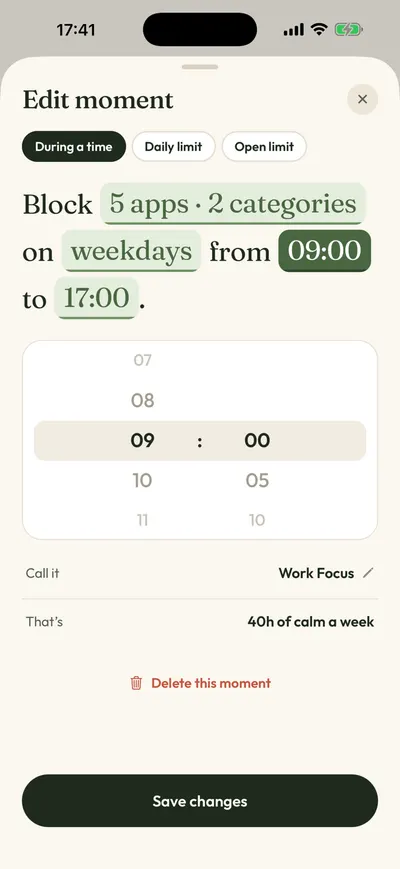
We make Calma, so weigh this section with that in mind. Clearspace steps in each time you open a chosen app and asks you to earn the time. Calma works on the clock instead. You pick the apps and the hours, like weekdays 9 AM to 5 PM or every night 10 PM to 7 AM, and during that window the app shows “Instagram is resting.” with a single Back to calm button. No exercise gets you past it. If you need the app early, you switch that routine off in Calma.
If you liked Clearspace’s daily budget of opens, Calma has open limits: 3, 5, 10, 20 or 50 opens a day. While you have opens left, the block screen shows Open app, and each open gives you 15 minutes. Daily time limits run from 15 minutes to 2 hours, and then the app rests until midnight.
Compared with Clearspace
- Blocks for a whole window, where Clearspace lets you in after the breath or exercise.
- No streaks, challenges or partners. The only number is time protected today.
- No account. Your rules stay on your iPhone, and Calma’s App Store label lists Usage Data, not linked to you.
- iPhone only and apps only. Clearspace also has an Android app and a Chrome extension that blocks websites.
- No free version beyond a 3-day trial, where Clearspace’s free version keeps working for one app. No student plan either.
Price: $3.99 a week, $9.99 a month or $39.99 a year in the US as of October 5, 2026, after a 3-day free trial. Pick it if you know the hours you slip and want them blocked. More on how Calma’s app blocker works.
one sec: best Clearspace alternative with research behind it
one sec is the nearest match to Clearspace. A breathing exercise runs before a chosen app opens, and you then continue or close it. It is the only app here with a peer-reviewed field study: in the 2023 PNAS paper, one sec cut openings of the target apps by 57% after six weeks. That result is for one sec only.
Compared with Clearspace
- The same free allowance, one app, and a yearly plan at $19.99 against $44.99.
- Runs on iPad and Mac as well, which Clearspace does not.
- No exercise challenges or accountability partner. On iPhone it relies on a Shortcuts automation you set up.
Price: $19.99 a year, $6.99 a month or $99.99 lifetime in the US App Store, as of September 28, 2026. Pick it if a breath is enough and you’d like to pay less. See one sec alternatives and Calma vs one sec.
ScreenZen: best free app like Clearspace
ScreenZen puts a wait in front of a chosen app, and its App Store listing says the wait can grow each time you open the app. It costs nothing: the only in-app purchases are tips, from $5 to $40.
Compared with Clearspace
- Free for every app, where Clearspace’s free version covers one.
- Strict blocks by time range or number of opens, and a settings lock.
- A countdown instead of exercise, and streaks instead of group challenges.
Price: free, tips optional. Pick it if you hit Clearspace’s one-app wall and don’t want to pay. Our ScreenZen alternatives page covers it in depth, and a Calma vs ScreenZen comparison puts it next to ours.
Jomo: best if you want to choose how hard each unlock is
Jomo lets each rule have its own kind of speed bump. Per its features page, an unlock can mean waiting, giving a reason, copying a text, a password or scanning a QR code, and Strict Mode rules can’t be deleted or bypassed.
Compared with Clearspace
- A menu of unlock tasks, where Clearspace’s are a breath or exercise.
- A Mac app. Jomo lists iPhone and Mac, not Android.
- A small free plan: 1 Session and 1 Action or Limit.
Price: $29.99 a year, $5.99 a month or $99.99 once, as of September 28, 2026. Pick it if you want a harder step than push-ups for your worst app. See apps like Jomo too.
Opal: best if you want no way out at all
Opal runs sessions that block apps, with three strictness levels. At the hardest level, a Pro feature, you can’t take breaks or leave early, and one Emergency Pass a week is the exit. It adds an Opal Score, reports and leaderboards.
Compared with Clearspace
- A hard lock with a weekly pass as the only exit, where Clearspace’s main design lets you in after the pause.
- More scores and rankings than Clearspace, if that motivates you.
- More than twice the yearly price: $99.99 against $44.99.
Price: $19.99 a month or $99.99 a year in the US App Store, as of September 28, 2026. Pick it if you do the reps and scroll anyway. See Opal alternatives.
Screen Time: best if you’d rather install nothing
Apple’s Screen Time is free and already on your iPhone. In iOS 27 you get Time Allowances, daily time for categories like Social Media, and a Screen Time Schedule with time windows for work, dinner or the evening. In iOS 26 the same ideas were called App Limits and Downtime.
Compared with Clearspace
- Free, and Apple’s iOS 27 guide says an allowance also covers a website the app declares.
- No pause or exercise before opening. The stop comes when your time runs out.
- Apple’s iOS 26 guide says “By default, Screen Time limits can be ignored once reached.” A Screen Time passcode helps most if someone else knows it.
Price: free. Pick it if you want a daily cap first and an app later. Our Calma vs Screen Time page has the setup.
Is Clearspace still worth it?
Yes, if the exercise gate works for you. Nobody else in this list asks for push-ups, squats or steps before an app opens. Clearspace also lets an accountability partner hear when you go over budget, and several App Store reviewers from 2025 and 2026 say students get Premium free. It also covers Android and Chrome, and it asks how long you want to stay before you go in.
Switch if you need more than one app for free (ScreenZen), want the same kind of pause for less money (one sec), want a lock you can’t talk past (Opal, Jomo’s Strict Mode), or keep slipping at the same hours and want those hours blocked (Calma).
How to switch from Clearspace to Calma
- Tell your accountability partner first. Clearspace’s launch page says a partner is notified if you delete Clearspace.
- Cancel Clearspace Premium if you pay through Apple: Settings > [your name] > Subscriptions, tap Clearspace, then Cancel Subscription.
- Turn off Clearspace’s rules for the apps you’re moving, so you don’t get a push-up screen and a block on the same app.
- Install Calma, allow Screen Time access when iOS asks, and pick the apps in Apple’s app picker.
- Open the Moments tab. Tap a ready-made routine like Night Peace or Work Focus, or tap New moment and set your own days and times. For something close to Clearspace’s budget of opens, add an open limit such as 5 opens a day.
- Tap Protect this moment. From then on, iOS applies the rule on its own, even when Calma is closed.
FAQ
Is there a free Clearspace alternative?
Yes. ScreenZen is free for every app, with tips as the only purchases. Apple Screen Time is free and built in. one sec is free for one app, the same allowance as Clearspace.
Is Clearspace better than one sec?
It depends on what stops you. Clearspace adds exercise, challenges and a partner. one sec is cheaper per year, runs on more devices and has a published study. If a breath already makes you close Instagram, one sec costs less.
Does Calma have push-ups or challenges like Clearspace?
No. Calma has no exercises, challenges or streaks. It blocks apps at set times, after a daily time limit, or after a set number of opens.
Can I use Clearspace and Calma together?
Yes, on different apps. For example, keep Clearspace’s push-ups for YouTube and a Calma bedtime block on TikTok. Two tools on the same app get confusing fast.
How we compared
On September 28, 2026 we checked Clearspace’s App Store listing, in-app prices, privacy label and recent reviews, its website and blog, and its Google Play and Chrome listings. Clearspace has no public pricing page or help center that we could find, so its prices come from the App Store. We rechecked the other apps’ App Store prices the same day; older checks are dated in the sources. We did not test the other apps hands-on, and “Not publicly stated” means an app doesn’t document that feature. No app paid to be listed. For the wider field, see the best app blockers for iPhone, or the Freedom alternatives page if you are also weighing a blocker for your computer.
Sources
- Clearspace on the App Store (4.7 from 8,880 US ratings, version 2.7.5 of Aug 19, 2026, Only for iPhone, in-app purchase prices, App Privacy label), checked 2026-09-28
- Clearspace App Store lookup (rating, count, version, description), checked 2026-09-28
- Clearspace App Store reviews (read most recent first, April 2025 to September 2026), checked 2026-09-28
- Clearspace product page (centering exercise, session length, focus sessions), checked 2026-09-28
- Clearspace launch page (free for one app, accountability partner, automatic session ending; undated), checked 2026-09-28
- Clearspace blog: Pushup, Squat and Step to Scroll challenges (May 5, 2025), checked 2026-09-28
- Clearspace on Google Play, checked 2026-09-28
- Clearspace extension on the Chrome Web Store, checked 2026-09-28
- one sec on the App Store (4.8 from 23,619 US ratings, in-app purchase prices), checked 2026-09-28
- one sec FAQ, checked 2026-09-25
- one sec platforms, checked 2026-09-25
- Grüning, Riedel and Lorenz-Spreen, PNAS 2023: Directing smartphone use through the self-nudge app one sec, checked 2026-09-25
- ScreenZen on the App Store (tip prices), checked 2026-09-28
- ScreenZen website, checked 2026-09-24
- Jomo pricing, checked 2026-09-28
- Jomo features (unlock challenges, Strict Mode), checked 2026-09-24
- Opal on the App Store (in-app purchase prices), checked 2026-09-28
- Opal Help Center: What are sessions?, checked 2026-09-24
- Apple Support: Set Screen Time Schedules and Time Allowances (iOS 27), checked 2026-09-28
- Apple Support: Set schedules with Screen Time on iPhone (iOS 26), checked 2026-09-24
- Calma on the App Store, checked 2026-09-24
Tired of earning your scroll time?
Calma blocks the apps you pick during the hours you pick, like 10 PM to 7 AM. No reps, no streaks, one button: Back to calm. Try it free for 3 days.