Calma vs ScreenZen: free pause or set-time blocks
ScreenZen is free and donation-supported: it puts a wait before a distracting app opens, with optional strict blocks and streaks, on iPhone, iPad, Mac and Android. Calma is an iPhone app blocker, free to download with a 3-day free trial of Calma Pro, that blocks the apps you pick at set times, like 10 PM to 7 AM, with no streaks and no account. Pick ScreenZen if price matters most or the wait still stops you, and pick Calma if you keep waiting out the timer and want whole hours of the day blocked.

By AASN Tech · Last checked: · Sources at the end. · How we compare apps
In one line: Pick ScreenZen if you want to pay nothing, need iPad, Mac or Android, or the wait still works. Pick Calma if you keep waiting out the timer and want set hours blocked on iPhone without streaks.
Which is better, Calma or ScreenZen?
Pick ScreenZen if you want to pay nothing, need iPad, Mac or Android, or the wait still works. Pick Calma if you keep waiting out the timer and want set hours blocked on iPhone without streaks.
The rows where the two actually differ. Checked Oct 5, 2026.
| Question | Calma | ScreenZen |
|---|---|---|
| Price (US, as of Oct 5, 2026) | $3.99 a week, $9.99 a month or $39.99 a year. The App Store also lists $9.99 a month | Free. Optional tips of $5, $10, $20 or $40. The halo device is a separate $49 |
| Free option | 3-day free trial. Blocking needs Calma Pro | Everything is free, with no subscription |
| Blocking style | Scheduled blocks, daily limits, open limits and focus sessions | A wait before each open that can grow every time, scroll interruptions, app goals and optional strict blocks |
| Ending a block early | Scheduled blocks and daily limits show only Back to calm. Switch the rule off in Calma, or hold 3 seconds to end a focus session | After the wait, you choose whether to open the app. Strict blocks and a settings lock are optional |
| Block screen | "Instagram is resting." with the rule and when it ends | A countdown with prompts like "Is this important", breathing and other activities |
| Websites | Apps only. Use Screen Time for websites | Blocks apps and websites |
| Scores and streaks | None. The only number is time protected today | Streaks, a daily screen time goal and screen time for your chosen apps |
| Account | No account. Rules stay on your iPhone | None for the core app, settings stay on the device. Apple or Google sign-in for halo and social features |
| Devices | iPhone (iOS 18 or later) | iPhone and iPad (iOS 16.4 or later), Mac (macOS 13 or later) and Android. Its website also lists Windows |
| App languages | 12 | 6 |
Is Calma like ScreenZen?
Calma and ScreenZen are both gentle app blockers that work on iPhone, but they act at different moments. ScreenZen slows down each open. Calma closes a part of the day.
ScreenZen works at the door. When you open a chosen app, like Instagram, ScreenZen first shows a wait. Its App Store listing calls it “a bit of time before choosing if you need to open your distracting app,” and the wait can grow each time you open the app. During the wait it can show prompts such as “Is this important” or a breathing exercise. When the wait ends, you decide.
Calma works on the clock. You pick the apps and the hours, like weeknights from 10 PM to 7 AM. Open Instagram in that window and Calma shows a calm screen saying it is resting, with one button: Back to calm. Outside the window, the app opens normally.
Better for you if: you slip all day in small moments, ScreenZen. If you slip at a known time, like in bed or in the first hour of work, Calma.
Is ScreenZen free?
Yes. ScreenZen is free and donation-supported. Its website says “Less screen time. No subscription.” On the US App Store, its only in-app purchases are tips: $5, $10, $20 or $40, as of October 5, 2026. Every feature works without paying.
ScreenZen also sells halo, an optional Bluetooth device that blocks chosen apps while you are in a room, like your bedroom. halo costs $49, ships to the US only, and the app does not need it.
Calma is not free to use. Calma is free to download, and blocking needs Calma Pro after a 3-day free trial for eligible new users. As of October 5, 2026, Calma Pro is $3.99 a week, $9.99 a month or $39.99 a year in the US.
Better for you if: price decides it, ScreenZen. ScreenZen costs nothing, and Calma Pro is $39.99 a year.
Can you skip a block in ScreenZen? Can you skip one in Calma?
In ScreenZen, the default is a wait, not a block. After the countdown you can open the app. ScreenZen adds stricter options you switch on yourself:
- Strict block by time range, after a number of opens, or through Screen Time, per its App Store listing.
- A settings lock so you can’t change your settings in the moment. Version 4.0.0 lets you choose a time when settings unlock and add an accountability partner who can let you back in.
- A lock mode that ScreenZen’s website says can prevent uninstalling and close common loopholes.
In Calma, it depends on the kind of rule:
- Scheduled blocks and daily limits show a single Back to calm button and nothing to unblock with. Getting the app back means opening Calma and turning that rule off.
- Open limits show Open app while opens are left, each good for 15 minutes.
- Focus sessions end on their own, and ending one early takes a 3-second hold.
Calma has no settings lock and no accountability partner. It is a gentle blocker by design.
Better for you if: you want to lock your own settings or hand the key to a friend, ScreenZen. If you want the exit moved off the block screen for a set window, Calma.
Does ScreenZen work on iPad, Mac and Android? Does Calma?
ScreenZen does, and Calma doesn’t. ScreenZen’s App Store page lists iPhone and iPad (iOS 16.4 or later) and Mac (macOS 13 or later), and ScreenZen has an Android app on Google Play. ScreenZen’s website also lists Windows, and says ScreenZen blocks apps and websites.
Calma is iPhone only and needs iOS 18 or later. Calma blocks apps, not websites. For websites on iPhone, pair Calma with Screen Time’s website restrictions.
Better for you if: your iPad, laptop or an Android phone is part of the problem, ScreenZen. If your iPhone is where you slip, either works.
Does ScreenZen have streaks? Does Calma?
ScreenZen has streaks. Its listing describes “Streaks to encourage you not to exceed your limits or override your settings.” Version 4.0.0 added a daily screen time goal, a Home Screen widget, a Minimal mode that hides Reels, Shorts and endless feeds, and Practice, where you breathe, journal or learn something to earn your opens. ScreenZen also shows screen time for only the apps you chose.
Calma has no streaks, scores, goals or usage charts. The only number Calma shows is time protected today, on the Today screen and in a Home Screen widget.
Better for you if: a streak keeps you going and you like extra tools, ScreenZen. If you want fewer screens between you and your phone, Calma.
Which one keeps more data on your phone?
Both keep blocking on the device and neither needs an account to block apps. ScreenZen’s privacy policy says settings and data for its core blocking “are stored only on your device.” It uses Apple ID or Google sign-in only for optional social accountability and halo, and that data sits in Google’s Firebase. The policy also says ScreenZen may collect a daily total of time and opens in your blocked apps through analytics it hosts itself.
Calma has no account and no social features. Calma rules stay on your iPhone, and Calma cannot see what you do inside apps. Calma’s App Store privacy label lists usage data that is not linked to you.
Better for you if: you want friends to see your progress, ScreenZen. If you want no account and no social layer at all, Calma.
Where ScreenZen is better
- Price. ScreenZen is free, with optional tips. Calma needs Calma Pro after the trial.
- More devices. iPhone, iPad, Mac and Android, plus Windows according to ScreenZen’s website.
- Websites. ScreenZen blocks sites as well as apps.
- Lock options. A settings lock with an unlock time or an accountability partner, and strict blocks.
- Feed tools. Minimal mode removes Reels, Shorts and endless feeds from some apps.
- A physical option. The $49 halo device blocks apps in a room.
- Track record. 4.9 stars from 50,963 US ratings as of October 5, 2026, and an update on September 6, 2026.
Where Calma is better
- Blocks a whole window. Scheduled blocks have no countdown and no continue button, only Back to calm.
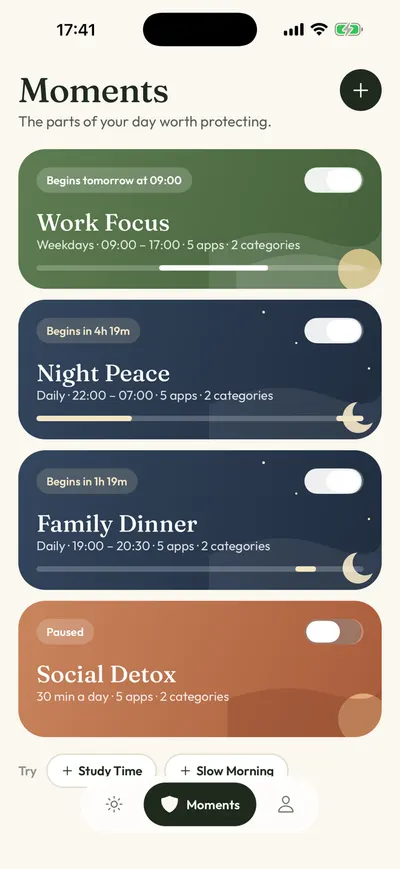
- Ready-made routines for work, bedtime, dinner and mornings, like Night Peace (10 PM to 7 AM) and Work Focus (weekdays, 9 AM to 5 PM).
- Rules that overlap without breaking each other, like Night Peace plus a 30-minute daily limit.
- Quieter by design. No streaks, goals, prompts or leaderboards.
- No account and no social layer. Rules stay on your iPhone.
- More languages. Calma is available in 12 languages. ScreenZen’s listing shows 6.
Can you use Calma and ScreenZen together?
Yes. Calma and ScreenZen can both be installed on the same iPhone, and each app asks for its own Screen Time permission (Apple’s Family Controls framework). Give each one different apps, so you know which one is stopping you. For example, a ScreenZen wait on Reddit all day and a Calma bedtime block on TikTok from 10 PM to 7 AM.
Avoid putting the same app in both. You would get a wait and a block on top of each other, and turning one off would leave the other in place.
How to set up Calma if you are coming from ScreenZen
- Unlock ScreenZen’s settings first, if you set a lock, so you can edit its rules. If you chose an unlock time, wait for it or ask your accountability partner.
- Remove the apps you are moving from your ScreenZen groups, so you don’t get a wait and a block on the same app.
- Install Calma, allow Screen Time access when iOS asks, and pick the same apps in Apple’s picker.
- Open the Moments tab and start from a suggestion like Night Peace, or tap New moment and set the days and times.
- Tap Protect this moment. If you liked ScreenZen’s limited opens, add an open limit, like 5 opens a day.
FAQ
Is ScreenZen really free?
Yes. ScreenZen calls itself donation-supported, and its App Store in-app purchases are tips from $5 to $40. The halo device costs $49 and is optional.
Is Calma a paid version of ScreenZen?
No. Calma is a different app from a different studio, AASN Tech in São Paulo, Brazil. Calma does not add a wait before each open. It blocks apps at set times, with daily limits, open limits and focus sessions.
Which one is stricter?
ScreenZen can be, if you turn on strict blocks and the settings lock. Its default is a wait you can get past. Calma’s scheduled blocks have no unblock button on the block screen, but you can still switch a rule off inside Calma.
Does ScreenZen work with Screen Time?
Yes. ScreenZen’s listing says strict blocks can work by time range, number of opens or Screen Time. Calma is built on Apple’s Screen Time APIs, so its blocks are applied by iOS and keep working when Calma is closed.
Should you use Calma or ScreenZen?
- Use ScreenZen if you want to pay nothing, need iPad, Mac or Android, want website blocking, or the wait still makes you close the app.
- Use Calma if you wait out the timer and open the app anyway, know your hard hours, and want them blocked on iPhone with no streaks or account.
- Try ScreenZen first if you have never used a pause before. It is free.
For more options, see our ScreenZen alternatives, the list of the best app blockers for iPhone, or how Calma’s app blocker works. Related reading: Calma vs one sec, Calma vs Screen Time, does a pause before opening apps work?, hard blocker vs gentle pause, Clearspace alternatives for an exercise-based pause, and how to block Instagram on iPhone.
Waiting out the timer every time?
Calma blocks the apps you pick for the hours you pick, with one button on the block screen: Back to calm. Try it free for 3 days.

Sources
- ScreenZen on the App Store (4.9 from 50,963 ratings, version 4.0.0 of Sep 6, 2026, features, tip prices, compatibility, 6 languages), checked 2026-10-05
- ScreenZen App Store lookup (rating count, version, release date, minimum iOS), checked 2026-10-05
- ScreenZen website (donation-supported, apps and websites, no subscription, lock mode, iOS, macOS, Windows and Android), checked 2026-10-05
- ScreenZen halo page and FAQ (price, US shipping, lock mode, account), checked 2026-10-05
- ScreenZen privacy policy (last updated Sep 8, 2026: on-device settings, Apple or Google sign-in for social and halo, Firebase, self-hosted analytics), checked 2026-10-05
- ScreenZen on Google Play, checked 2026-10-05
- Apple Developer: Family Controls framework, checked 2026-10-05
- Calma on the App Store (prices, version 1.2.0, 12 languages, iOS 18.0 or later), checked 2026-10-05