6 one sec alternatives for iPhone in 2026
The best one sec alternatives for iPhone are ScreenZen if you want the same kind of pause for free, Clearspace if you like challenges, Jomo if you want to choose how hard each unlock is, Opal if you want a strict mode with reports, Screen Time if you want free and built in, and Calma if you'd rather block apps at set times than pause every open.

By Antonio Neto · Last verified: · Sources at the end.
 Free trial · Data stays on your iPhone
In one line: Stay with one sec for a research-backed pause on every open. Switch if you want something free, or blocks tied to the clock.
one sec alternatives compared
Same fields we use on every comparison page. US prices as of Sep 24, 2026.
| Feature | one sec | Calma | Clearspace | Jomo | Opal | Screen Time | ScreenZen |
|---|---|---|---|---|---|---|---|
| Price | $6.99/mo, $19.99/yr or $99.99 lifetime | $3.99/wk or $39.99/yr | $6.99/mo or $44.99/yr | $5.99/mo, $29.99/yr or $99.99 once | $19.99/mo, $99.99/yr or $399 lifetime | Free | Free, optional tips |
| Free tier | One app | 3-day free trial, then Calma Pro | Not publicly stated | 1 session and 1 action or limit | 1 rule, app blocking, today's Opal Score | Everything | Everything |
| Blocking style | Breathing pause before the app opens | Calm block screen at set times | Breathing pause or exercise before the app opens | Blocks at set times, after a limit, or until you act | Sessions with three strictness levels | Limit screen and Screen Time Schedule (called Downtime in iOS 26) | Wait before opening, can grow each time |
| Can you end a block early? | Continue after the pause, or close the app. Pro block sessions can be strict | Scheduled blocks: Back to calm only, switch the rule off in the app. Focus sessions: 3-second hold | Proceed after the pause, or opt out | Unlock tasks like waiting or giving a reason. Strict Mode can't be bypassed | Easy level: break or stop. Deep Focus (Pro): 1 Emergency Pass a week | Ignore Limit by default. A passcode makes it stricter | Open after the wait. Strict blocks and a settings lock are optional |
| Schedules | Pro: block sessions and schedules | Yes, overnight and overlapping | Yes | Yes | Yes | Screen Time Schedule | Yes, by time range |
| Time limits | Kicks you out after a set time | 15 min to 2 h a day | Yes | Yes | Yes | Time Allowances (called App Limits in iOS 26) | Yes, strict block after Screen Time use |
| Open limits | Not publicly stated | 3 to 50 opens a day | Not publicly stated | Not publicly stated | Yes | None | Yes, strict block after a number of opens |
| Streaks and gamification | Progress charts | None | Challenges, accountability partners | Squads, reports | Opal Score, leaderboards, rewards | Weekly report | Streaks |
| Platforms | iPhone, iPad, Mac, Android, browsers | iPhone | iPhone, Android, Chrome | iPhone, Mac | iPhone, Android, Mac | iPhone, iPad, Mac | iPhone, iPad, Mac, Android, Windows |
Who should pick one sec, and who should pick Calma?
Pick one sec if
- You want a pause before every open, and research behind it.
- You want the same tool on Mac, Android and in your browser.
- You want the cheapest yearly plan here: $19.99 in the US App Store.
Pick Calma if
- Your problem is a time of day, like bedtime or work, not every single open.
- You want an app to stay blocked for the whole window, with no continue button.
- You like the idea of "Instagram, 3 opens a day" instead of a pause each time.
- You don't want charts or streaks.
Why look for a one sec alternative?
People look for a one sec alternative when they want it free, want a harder stop, or want blocks tied to the clock instead of a pause on every open. one sec is a well-made app with 4.8 stars from 23,595 US App Store ratings as of September 24, 2026, and it is the only app we found in this category with a peer-reviewed study. The common reasons to compare, from one sec’s own pages:
- The free version covers one app. one sec’s FAQ says the free version “allows to set up a breathing interruption for one app.” More apps need one sec pro.
- The pause lets you through. That is the design. The pop-up, per the PNAS study, includes “the option to dismiss opening the target app.” Some people want the app to stay closed.
- Setup runs through Shortcuts. The App Store listing says “one sec uses Shortcuts Automation” to show the breathing animation, so you set up automations in Apple’s Shortcuts app.
- The problem is a time of day. If your trouble is bed or the first hour of work, a schedule that blocks the app for that window may fit better than a pause on every open.
What does the one sec research actually show?
It shows that a pause works for many people. In a 2023 PNAS study, 280 people used one sec for six weeks. The authors report that one sec “decreased users’ actual opening of target apps by 57% after six consecutive weeks.” Note the wording: openings, not total time.
A second part of the study, with 500 people, tested one sec’s three features separately. The option to dismiss had “the strongest effect,” the waiting time helped too, and “the deliberation message was not effective.” In other words, being asked to choose seemed to matter more than being told why.
That study tested one sec, not the apps below, so don’t read it as evidence for any of them. It is still a useful lens: ScreenZen’s wait and Clearspace’s pause keep a deliberate choice, like one sec, while Opal’s Deep Focus and Jomo’s Strict Mode remove it, which suits people who always tap through. For the study’s limits and the other research on pauses, see does a pause before opening an app actually work?
ScreenZen: best free app like one sec
ScreenZen does what one sec does, for free. It makes you wait before a chosen app opens, and “you can have the wait time increase each time you open your app,” per its App Store listing. Its site says “ScreenZen is completely free.”
Compared with one sec
- Free for every app, where one sec’s free version covers one.
- Adds strict blocks by time range or number of opens, and a settings lock.
- Has no published study of its own, and it uses streaks.
Price: free, with optional tips from $5 to $40. Pick it if you like one sec’s idea but not paying for more than one app.
Clearspace: best if a breath isn’t enough of a speed bump
Clearspace puts a pause in front of a chosen app too, but the pause can be a short exercise instead of a breath. Its product page asks whether you’ll “proceed after a deep breath or opt out,” and it adds challenges and accountability partners on top.
Compared with one sec
- A more active pause, plus a partner who can hold you to your goals.
- Schedules and app limits in the same app.
- No iPad or Mac app, where one sec runs on both.
Price: $6.99 a month or $44.99 a year for Premium in the US App Store, more than one sec’s $19.99 a year. Pick it if a challenge motivates you more than a breath.
Jomo: best if you want a pause on some apps and a wall on others
Jomo lets you pick the strength per rule. A rule can block at set times, after a limit, or “until you take action,” and the unlock can be a short wait, a reason, retyped text or a QR code. Strict Mode “makes your rules unbreakable.”
Compared with one sec
- A one sec-style wait on one app, and a hard block on another.
- Strict Mode, for apps where a pause never holds.
- No iPad app on the App Store, where one sec has one.
Price: $5.99 a month, $29.99 a year or $99.99 once. Pick it if a pause works for some apps but not for all of them.
Opal: best if you keep tapping through the pause
Opal is the opposite of one sec. Instead of asking before each open, it runs sessions that block apps, and its strictest level, Deep Focus, “won’t let you cancel or bypass at all,” with one Emergency Pass a week. It adds an Opal Score and leaderboards.
Compared with one sec
- A hard stop, where one sec always lets you continue.
- Scores and rankings, if you want to track progress.
- Five times the yearly price: $99.99 against one sec’s $19.99.
Price: $19.99 a month, $99.99 a year or $399 lifetime. Pick it if the pause has stopped working for you. Our Opal alternatives page covers it in depth.
Screen Time: best if you want to try free first
Apple Screen Time has no pause before opening. It gives you daily Time Allowances and a Screen Time Schedule, and when the time runs out you see a limit screen with Ignore Limit.
Compared with one sec
- Free for every app, and it blocks websites by URL.
- No pause: the stop comes at the end of your time, not before each open.
- Apple’s iOS 26 guide says “By default, Screen Time limits can be ignored once reached.”
Price: free. Pick it if you want a daily cap and nothing to install. See Calma vs Screen Time for the full setup.
Calma: best if your scrolling happens at set times
Calma is ours, so here it is against one sec specifically. one sec asks every time you open an app. Calma works on the clock: you choose the apps and the times, like every night 10 PM to 7 AM, and during that window the app shows “Instagram is resting.” with one button, Back to calm. There is no continue button on that screen. To get the app back early, you switch the rule off in Calma.
Calma’s closest option to one sec is an open limit. “Allow Instagram 3 opens a day” shows an Open app button while you have opens left, and each open lasts 15 minutes.
Compared with one sec
- Blocks for a whole window, where one sec lets you through after the pause.
- No charts or streaks, and no account. Your rules stay on your iPhone.
- iPhone only and apps only, where one sec also runs on Mac, Android and in browsers.
- No free plan beyond a 3-day trial, and no published research of its own.
Price: $3.99 a week or $39.99 a year in the US, with a 3-day free trial. Pick it if you already know when you slip, like in bed or in the first hour of work. Here is how Calma’s app blocker works, and the head-to-head is in Calma vs one sec.
Is one sec still worth it?
Yes, if the pause is doing its job. It costs $19.99 a year, it runs on iPhone, iPad, Mac, Android and in browsers, and its research is real. Stay with one sec if the breath before Instagram still makes you close it.
Switch if you want it free (ScreenZen), if you tap through every time and want a hard stop (Opal, Jomo’s Strict Mode), or if your problem is a specific time of day (Calma).
How to switch from one sec to Calma
- Cancel one sec pro if you paid in the App Store: Settings > [your name] > Subscriptions, tap one sec, then Cancel Subscription.
- Turn off the one sec automations in the Shortcuts app, so you don’t get a pause and a block on the same app.
- Install Calma and allow Screen Time access, then pick the apps from Apple’s app picker.
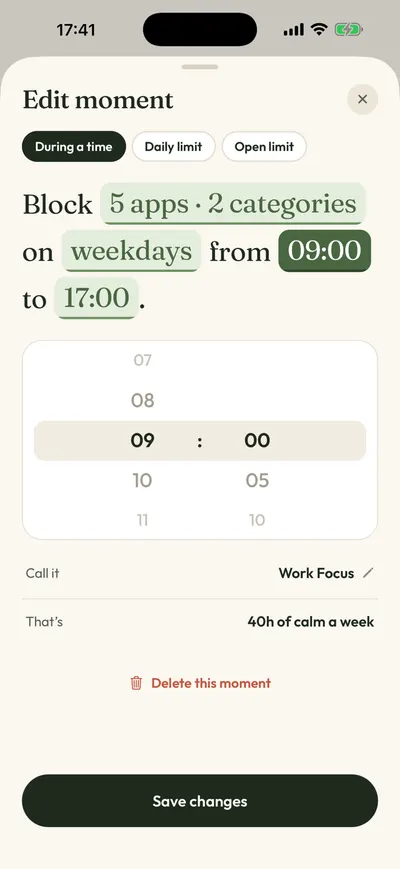
- Open the Moments tab. Tap a suggestion like Night Peace, or tap New moment. To keep a one sec-like feel, choose an open limit, like 5 opens a day.
- Tap Protect this moment. The rule is saved and runs at the times you set.
FAQ
Is there a free app like one sec?
Yes. ScreenZen is free and works the same way: a wait before a chosen app opens. Apple Screen Time is also free, though it limits time rather than pausing each open.
Is one sec better than ScreenZen?
They are close. one sec has the published research, a Mac app and browser extensions. ScreenZen is free and adds strict blocks and a settings lock. Try ScreenZen first if price matters.
Does Calma have a breathing pause like one sec?
No. Calma blocks apps during set times, or after a daily time limit or a number of opens. It does not show a breathing exercise.
Can I use one sec and Calma together?
You can, for different apps. For example, one sec on YouTube and a Calma bedtime block on Instagram. Using both on the same app gets confusing.
How we compared
We read each app’s App Store listing, pricing page and help pages on September 24, 2026, and dated every price. This comparison is based on public documentation, not hands-on tests of the other apps. Where an app does not say something publicly, the table says so. We don’t accept payment for placement. For more apps, see the best app blockers for iPhone or ScreenZen alternatives.
Sources
- Grüning, Riedel and Lorenz-Spreen, PNAS 2023: Directing smartphone use through the self-nudge app one sec, checked 2026-09-24
- one sec on the App Store (4.8 from 23,595 ratings, version 6.0.1, Sep 20, 2026), checked 2026-09-24
- one sec FAQ, checked 2026-09-24
- one sec platforms, checked 2026-09-24
- ScreenZen website, checked 2026-09-24
- ScreenZen on the App Store, checked 2026-09-24
- Clearspace on the App Store (in-app purchase prices), checked 2026-09-24
- Clearspace product page, checked 2026-09-24
- Jomo pricing, checked 2026-09-24
- Jomo features, checked 2026-09-24
- Opal pricing page, checked 2026-09-24
- Opal Help Center: What are sessions?, checked 2026-09-24
- Apple Support: Set schedules with Screen Time on iPhone (iOS 26), checked 2026-09-24
- Calma on the App Store, checked 2026-09-24
Prefer blocks on a schedule?
Calma rests the apps you pick at the times you pick, like 10 PM to 7 AM, with one calm button: Back to calm. Try it free for 3 days.