6 Brick alternatives for iPhone, no device needed
The best Brick alternatives for iPhone without buying hardware are Foqos if you still want to tap or scan to block, for free; Jomo if you want a QR code or password as the unlock; Opal if you want a Hard Mode with no way out; Screen Time with a passcode someone else keeps; ScreenZen if you want a free wait before each open; and Calma if you want apps blocked at set times with no device to carry.

By Antonio Neto · Last verified: · Sources at the end.
 Free trial · Data stays on your iPhone
In one line: Keep Brick if a key outside your phone is what works for you. Look elsewhere if you don't want to carry, lose or pay for one.
Brick alternatives compared
Same fields we use on every comparison page. US prices as of Sep 24, 2026.
| Feature | Brick | Calma | Foqos | Jomo | Opal | Screen Time | ScreenZen |
|---|---|---|---|---|---|---|---|
| Price | $59 once for the device, no subscription | $3.99/wk or $39.99/yr | Free, optional tips $1.99 to $9.99 | $5.99/mo, $29.99/yr or $99.99 once | $19.99/mo, $99.99/yr or $399 lifetime | Free | Free, optional tips $5 to $40 |
| Free tier | App is free, but needs the Brick | 3-day free trial, then Calma Pro | Everything | 1 Session and 1 Action or Limit | 1 rule, unlimited one-off sessions, today's Opal Score | Everything | Everything |
| Blocking style | Tap a physical Brick to block and unblock | Calm block screen at set times | Tap an NFC tag or scan a QR code to block | Blocks at set times or after a limit, with unlock challenges | Sessions and rules, with an optional Hard Mode | Time Allowances and a Screen Time Schedule | Wait before opening, can grow each time. Optional strict blocks |
| Can you end a block early? | Tap the Brick again, or use 1 of 5 Emergency Unbricks, more by email | Scheduled blocks: Back to calm only, switch the rule off in the app. Focus sessions: 3-second hold | Tap or scan again | Pass a challenge: wait, give a reason, password or QR code. Strict Mode rules can't be bypassed | Break or leave early after a wait. Hard Mode (Pro): no way out, 1 Emergency Pass a week | A Screen Time passcode stops changes. Strict only if someone else knows it | Open after the wait. Strict blocks and a settings lock are optional |
| Schedules | Yes | Yes, overnight and overlapping | Scheduled sessions | Yes | Yes | Screen Time Schedule time windows | Yes, by day and time |
| Time limits | Not publicly stated | 15 min to 2 h a day | Not publicly stated | Yes | Yes, apps and websites | Time Allowances by category | App goals, with an optional block at the limit |
| Open limits | Not publicly stated | 3 to 50 opens a day | Not publicly stated | Not publicly stated | Yes | None | Strict block after a number of opens |
| Streaks and gamification | Usage history and a focus timer that counts blocked time | None | Not publicly stated | Reports and Squads | Opal Score, leaderboards, rewards | Weekly report | Streaks |
| Platforms | iPhone (iOS 17 or later), Android | iPhone | iPhone (iOS 17.6 or later), Mac in beta | iPhone, Mac | iPhone, Android, Mac | iPhone, iPad, Mac | iPhone, iPad, Mac, Android |
Who should pick Brick, and who should pick Calma?
Pick Brick if
- You want the unlock to live outside your phone, somewhere you have to walk to.
- You'd rather pay $59 once than a subscription.
- You want Strict Mode, which Brick says prevents deleting the app or changing settings to unbrick.
Pick Calma if
- You don't want a device to carry, lose or remember when you travel.
- You want blocks that start and end on their own, like weekdays 9 AM to 5 PM.
- You want daily limits and open limits, not only on and off.
- You want a deliberate way out in the app, not an emergency count.
Why look for a Brick alternative?
People look for a Brick alternative when the device itself becomes the problem: its cost, carrying it, or losing it. Brick is well liked, with 4.9 stars from 54,933 US App Store ratings as of September 24, 2026, and its idea is simple. Its FAQ says you can block from anywhere, but “You will still need the physical device to unbrick.” The reasons to compare:
- You pay for hardware first. The Brick costs $59, with no subscription after that. Brick offers a 30-day money-back guarantee.
- The key has to be where you are. Traveling, a day at the office, a Brick left at home: without the device, your way out is one of five Emergency Unbricks, and after that you email Brick for more.
- Timed sessions. Since June 2026, more than a dozen App Store reviews we read ask Brick to bring back a timer that let a block end on its own. Reviewers say it was removed, and that scheduled modes are now the way to get blocks that end without a tap.
- Only iPhone and Android. Brick’s FAQ lists iPhones on iOS 17 or later and Android 12 or later. Two recent reviews say it didn’t work on their iPad.
If none of that bothers you, Brick is doing its job. The alternatives below are for people who want a similar commitment without the object.
Foqos: best if you like tapping to block but not the price
Foqos is the closest thing to Brick without buying a Brick. You block apps by tapping your iPhone on an NFC tag or scanning a QR code, and you tap or scan again to unblock. A QR code can be printed on paper and stuck on a wall, so the “key” can cost nothing. It is open source under the MIT license.
Compared with Brick
- Free, with optional tips from $1.99 to $9.99.
- Bring your own key: an NFC sticker you buy, or a printed QR code.
- iPhone only (iOS 17.6 or later), with a Mac version in beta. Brick also runs on Android.
Cost: $0, unless you buy NFC stickers. Pick it if the tap is what works for you and $59 is what doesn’t.
Jomo: best if you want a QR code, a password or a wait as the unlock
Jomo lets you choose what unlocking costs you. Its features page lists a short wait, a reason, retyping a text, a password or a QR code scan. Keep the QR code in another room and you have Brick’s walk-to-unlock, without a device. Strict Mode “makes your rules unbreakable,” per Jomo.
Compared with Brick
- The strength is set per rule, from a gentle wait to a hard wall.
- Daily limits and scheduled blocks in the same app.
- A subscription or a one-time $99.99, where Brick is $59 once.
Cost: $29.99 a year for Jomo Plus, or $5.99 a month, or $99.99 once. Pick it if you want to decide how hard each app is to reach.
Opal: best if you want software that is as strict as a Brick
Opal’s Hard Mode is the software version of leaving the key at home. Opal’s pricing page describes it as “No way out. You can’t turn Opal off.” If you need out, you get one Emergency Pass a week, which ends all blocks for an hour.
Compared with Brick
- Nothing to carry, and it runs on iPhone, Android and Mac.
- An Opal Score, reports and leaderboards, where Brick keeps a usage history.
- Hard Mode needs Opal Pro, at $99.99 a year, more than one Brick.
Cost: Opal Pro at $99.99 a year ($19.99 a month, $399 lifetime). Pick it if you want no way out and don’t mind a subscription. See Opal alternatives and Calma vs Opal.
Screen Time with someone else’s passcode: best free option
Apple’s Screen Time becomes a real barrier when you don’t know the passcode. On iOS 27 you set Time Allowances for categories and a Screen Time Schedule for times of day, then lock them in Manage Screen Time > Lock Screen Time Settings. Ask a partner or friend to type the four-digit code. Now the key is a person instead of a device.
Compared with Brick
- Free and built in.
- Relies on another person, who has to say yes each time you ask.
- Allowances are per category, so apps in one category share their time.
Cost: included with iOS. Pick it if you have someone willing to hold the code. The full free setup is in Calma vs Screen Time.
ScreenZen: best free app if a wait is enough
ScreenZen replaces Brick’s tap with a wait before a chosen app opens, and the wait can grow with each open. It can also strict-block apps by time range or after a number of opens. Its App Store purchases are only tips, from $5 to $40.
ScreenZen also sells a device of its own, halo, for $49. Its page says it “automatically blocks the apps you can’t resist, until you leave your bedroom.”
Compared with Brick
- Free, where Brick costs $59.
- Runs on iPhone, iPad, Mac and Android.
- By default the wait lets you in, so it is gentler than Brick.
Cost: free, tips optional. Pick it if a pause is enough. More options in our ScreenZen alternatives.
Calma: best if you want blocks that start and stop on their own
Calma is ours, so here it is against Brick. Brick asks you to tap to start and tap to stop. Calma runs on a schedule you set once, like every night from 10 PM to 7 AM, so the block begins and ends by itself and there is nothing to carry. During the block, the app shows “Instagram is resting.” with one button, Back to calm.
Calma is gentler than Brick on purpose. To use an app early, you open Calma and switch the rule off. That step stays available in the app, and some people want a harder wall than that.
Compared with Brick
- No device to buy, carry or lose, and no count of emergency unlocks.
- Daily limits (15 minutes to 2 hours) and open limits (3 to 50 a day), not only on and off.
- A subscription, where Brick is paid once. Two years of Calma costs more than one Brick.
- iPhone only.
Cost: Calma Pro is $39.99 a year or $3.99 a week in the US; new subscribers get 3 days free. Pick it if your problem is a time of day and you’d rather set it than tap it. See what Calma’s app blocker does.
Is Brick still worth it?
Yes, if you want your unlock to live outside your phone. It is a one-time $59, it comes with a 30-day money-back guarantee, and its FAQ says blocking information “is stored locally on your phone.” Strict Mode, per Brick, closes the loopholes of deleting the app or changing settings.
It is worth less if you move around a lot, since the device has to be with you to unblock, or if you mostly want blocks that end on a timer.
How to switch from Brick to Calma
- Unbrick your phone with the device, so no Brick mode is active when you remove it.
- Turn off Brick’s schedules, so two apps don’t block the same things.
- Install Calma, accept the Screen Time permission, and select the apps your Brick modes covered.
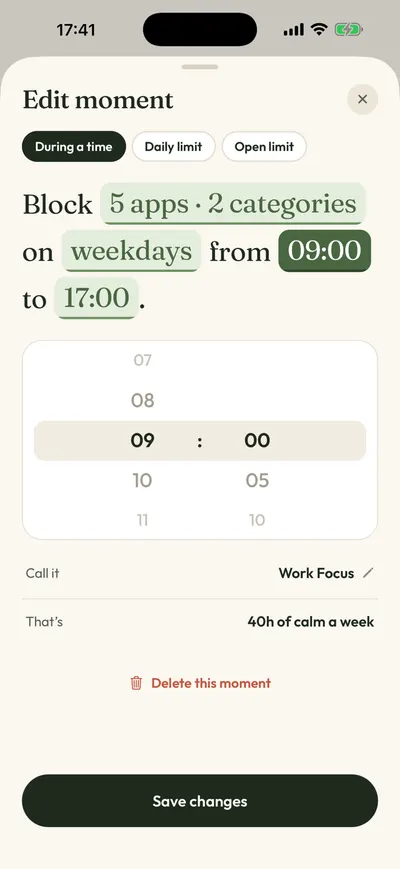
- Recreate your modes as Moments. A Brick “Sleep” mode becomes Night Peace, and “Deep work” becomes Work Focus (weekdays, 9 AM to 5 PM). Tap the words to change apps, days and times.
- Tap Protect this moment. The block now starts and ends on its own.
FAQ
Is there a free Brick alternative?
Yes. Foqos is free and works the same way, with an NFC tag or QR code you supply. ScreenZen and Apple Screen Time are free too, but they use a wait or a passcode instead of a tap.
Can I use an NFC sticker instead of a Brick?
With Foqos, yes. It is built for NFC tags or QR codes. The Brick app itself works with the Brick device.
What happens if I lose my Brick?
Brick’s FAQ says you get five Emergency Unbricks that unblock all apps, and you can email Brick to request more.
Is Calma as strict as Brick?
No. Calma’s block screen has only Back to calm, but you can switch a rule off in the Calma app. Brick needs the device or an Emergency Unbrick. If you want Brick-level strictness in software, look at Opal’s Hard Mode or Jomo’s Strict Mode.
How we compared
We read each app’s App Store listing, website, pricing page and help pages on September 24, 2026, and dated every price. We also read Brick’s App Store reviews from June to September 2026. None of the other apps were tested hands-on for this page, so it rests on what each company publishes. Anything an app doesn’t document is marked “Not publicly stated” in the table. Placement here isn’t for sale. For the wider field, see the best app blockers for iPhone.
Sources
- Brick product page, price and 30-day guarantee, checked 2026-09-24
- Brick FAQ (compatibility, Emergency Unbricks, local storage, 10 modes), checked 2026-09-24
- Brick on the App Store (4.9 from 54,933 ratings, version 2026.38.0 of Sep 21, 2026), checked 2026-09-24
- Brick App Store reviews (June to September 2026), checked 2026-09-24
- Foqos on the App Store (tips, compatibility, release notes), checked 2026-09-24
- Foqos source code on GitHub (MIT license), checked 2026-09-24
- Jomo features (unlock challenges, Strict Mode), checked 2026-09-24
- Jomo pricing, checked 2026-09-24
- Jomo on the App Store (monthly price), checked 2026-09-24
- Opal pricing page, checked 2026-09-24
- Opal Help Center: How to use Sessions, checked 2026-09-24
- ScreenZen on the App Store, checked 2026-09-24
- ScreenZen halo page and FAQ, checked 2026-09-24
- Apple Support: Set Screen Time Schedules and Time Allowances (iOS 27), checked 2026-09-24
- Apple Support: Create, change, or remove a Screen Time passcode, checked 2026-09-24
- Calma on the App Store, checked 2026-09-24
Want the block without the device?
Calma blocks the apps you pick at the times you pick, and it all lives on your iPhone. Try it free for 3 days.