Calma vs Opal: schedules without the score
Opal and Calma both block iPhone apps on a schedule using Apple's Screen Time. Opal adds an Opal Score, leaderboards, website blocking, a Mac and Android app, and a Hard Mode you can't turn off. Calma is iPhone only and deliberately quieter: no scores or streaks, a calm block screen, and $39.99 a year against Opal Pro's $99.99.

By Antonio Neto · Last checked: · Sources at the end.
In one line: Pick Opal for stats, strictness and more devices. Pick Calma if you want set-time blocks on iPhone without a scoreboard, for less.
Calma vs Opal at a glance
The rows where the two actually differ. Checked Sep 24, 2026.
| Question | Calma | Opal |
|---|---|---|
| Price (US, as of Sep 24, 2026) | $3.99 a week or $39.99 a year | Opal Pro: $19.99 a month, $99.99 a year or $399 once |
| Free option | 3-day free trial. Blocking needs Calma Pro | Free plan: 1 rule, unlimited one-off sessions, today's Opal Score |
| Blocking style | Scheduled blocks, daily limits, open limits and focus sessions | Sessions and recurring rules, with schedules, time limits and open limits |
| Ending a block early | Scheduled blocks and daily limits show only Back to calm. Switch the rule off in Calma, or hold 3 seconds to end a focus session | Unblock Apps or Leave Early after a Waiting Room countdown. Hard Mode (Pro): no way out, one Emergency Pass a week |
| Block screen | "Instagram is resting." with the rule and when it ends | Mindful block screens with quotes and puns |
| Websites | Apps only. Use Screen Time for websites | Blocks apps and websites |
| Scores and streaks | None. The only number is time protected today | Opal Score, focus report, leaderboard, milestones |
| Account | No account. Rules stay on your iPhone | Opal account used to buy Pro on the web; Opal says browsing data never leaves your device |
| Devices | iPhone | iPhone, Android and Mac |
Is Calma like Opal?
Partly. Both apps use Apple’s Screen Time permission to block the apps you choose, both run blocks on a schedule, and both support daily time limits and open limits. The difference is in everything around the block.
Opal is built to motivate you with numbers. Its App Store listing describes a Focus Score (the Opal Score on its pricing page), a Focus Report that lets you “benchmark against your peers,” a leaderboard and milestones you can share. Calma is built to stay out of the way. There are no charts, streaks or rankings, and the only number it shows is how much time was protected today.
Better for you if: numbers keep you going, Opal. If a score would make you feel graded, Calma.
Can you skip a block in Opal? Can you skip one in Calma?
In Opal, it depends on the setting. A normal session lets you Unblock Apps or Leave Early after a countdown in a “Waiting Room.” With Hard Mode on, which needs Opal Pro, Opal’s pricing page says “No way out. You can’t turn Opal off.” The only exit is an Emergency Pass, once a week, which cancels running sessions, schedules and limits for one hour.
In Calma, it depends on the kind of rule:
- Scheduled blocks and daily limits offer a single Back to calm button and nothing to unblock with. Getting the app back means opening Calma and turning that rule off.
- Open limits show Open app while opens are left, each good for 15 minutes.
- Focus sessions end on their own, and ending one early takes a 3-second hold.
Calma has nothing like Hard Mode. Your rules stay in the Calma app, which is the point, and also the limit.
Better for you if: you want a lock you can’t undo, Opal with Hard Mode. If you want a pause that moves the exit off the block screen, Calma.
Which is cheaper, Calma or Opal?
Calma is cheaper for a paid plan. As of September 24, 2026, Calma Pro is $3.99 a week or $39.99 a year in the US. Opal Pro is $19.99 a month, $99.99 a year or $399 once, per Opal’s pricing page.
Opal is cheaper if you only need a little. Its free plan keeps 1 rule, unlimited one-off sessions and today’s Opal Score, with no time limit, per Opal’s pricing page. Calma has no free blocking: after the 3-day free trial, blocking needs Calma Pro.
Opal also notes that purchases made in the iPhone app “are processed by Apple and can’t be refunded by Opal directly.”
Better for you if: you need one rule, Opal’s free plan. If you want several routines and pay yearly, Calma costs $60 less a year.
Does Opal work on Mac and Android? Does Calma?
Opal does, and Calma doesn’t. Opal’s pricing page lists iOS, Android and Mac, and its sessions can include websites as well as apps. Calma is an iPhone app, and it blocks apps only. For websites on iPhone, pair Calma with Screen Time’s website restrictions.
Better for you if: your laptop or an Android phone is part of the problem, Opal. If your phone is where you slip, either works.
Where Opal is better
- Strictness. Hard Mode offers no way out except one Emergency Pass a week.
- More devices. iPhone, Android and Mac.
- Websites. Opal blocks sites along with apps.
- A free plan that keeps working, with 1 rule and unlimited one-off sessions.
- Stats. Opal Score with history, focus reports and leaderboards.
- Integrations. The listing mentions iPhone Focus mode sync and Shortcuts automations.
- Track record. 4.7 stars from 88,415 US ratings, and an update on September 22, 2026.
Where Calma is better
- Price. $39.99 a year against $99.99.
- No scoreboard. No streaks, scores, leaderboards or peer benchmarks.
- No account. Rules stay on your iPhone.
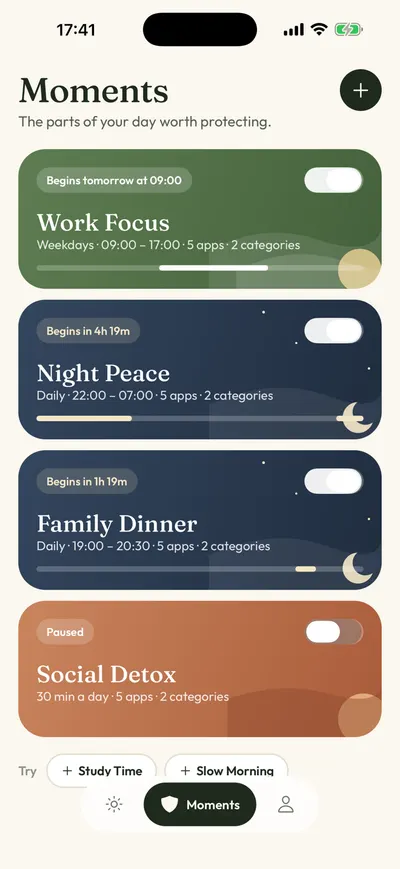
- Ready-made routines for work, bedtime, dinner and mornings, like Night Peace (10 PM to 7 AM) and Family Dinner (7 PM to 8:30 PM).
- Rules that overlap without breaking each other, like Night Peace plus a 30-minute daily limit.
- A block screen that tells you the rule and when it ends, instead of a quote.
Can you use Calma and Opal together?
You can install both, since both ask for Apple’s Screen Time permission (the Family Controls framework). It is simpler to pick one for app blocking. With two blockers on the same app, you can’t tell which one is stopping it, and ending a block in one leaves the other in place.
If you keep both, split the work: Opal for websites and your Mac, Calma for iPhone apps at set times.
How to set up Calma if you are coming from Opal
- Cancel Opal Pro if you paid in the App Store: Settings > [your name] > Subscriptions, tap Opal, then Cancel Subscription.
- End or delete your Opal rules and sessions, so they don’t overlap with Calma’s. If Hard Mode is running, you’ll need to wait for it to end or use your Emergency Pass.
- Install Calma, allow Screen Time access, and pick the apps you blocked in Opal.
- Open the Moments tab and start from a suggestion like Work Focus (weekdays, 9 AM to 5 PM), or tap New moment.
- Tap Protect this moment. For websites you blocked in Opal, add them to Screen Time’s Never Allow list.
FAQ
Is Calma a cheaper Opal?
For iPhone scheduling, roughly. Calma covers scheduled blocks, daily limits, open limits and focus sessions for $39.99 a year. It leaves out what Opal adds on top: scores, website blocking, Hard Mode and apps for Mac and Android.
Does Opal have a free version?
Yes. Opal’s free plan includes 1 rule, app blocking, unlimited one-off sessions and today’s Opal Score. Hard Mode, unlimited rules, Allow Only and score history need Opal Pro.
Which one is stricter?
Opal, with Hard Mode on. Calma never locks you out of your own rules. Its scheduled and daily-limit block screens simply have no unblock button.
Do Opal or Calma see what I do in my apps?
Both work through Apple’s Screen Time permission. Opal’s listing says “personal browsing data never leaves your device.” Calma cannot see what you do inside apps, has no account, and keeps your rules on your iPhone.
Should you use Calma or Opal?
- Use Opal if you want a score and reports, a Hard Mode with no way out, website blocking, or the same blocker on Mac or Android.
- Use Calma if you want set-time blocks on iPhone with no streaks or leaderboards, and would rather pay $39.99 a year than $99.99.
- Start with Opal’s free plan if one rule is all you need.
For more options, see our Opal alternatives, the list of the best app blockers for iPhone, or how Calma’s app blocker works.
Want Opal's schedules without the score?
Set Night Peace or Work Focus once and Calma rests those apps on schedule, with no score to keep up. Try it free for 3 days.

Sources
- Opal pricing page (plans, free tier, Hard Mode, refunds), checked 2026-09-24
- Opal Help Center: How to use Sessions (breaks, Leave Early, Emergency Pass), checked 2026-09-24
- Opal on the App Store (4.7 from 88,415 ratings, version 4.16 of Sep 22, 2026, features and privacy text), checked 2026-09-24
- Opal Help Center: Opal's Mac app, checked 2026-09-24
- Apple Support: Cancel a subscription from Apple, checked 2026-09-24
- Apple Developer: Family Controls framework, checked 2026-09-24
- Calma on the App Store, checked 2026-09-24