6 Freedom app alternatives for iPhone in 2026
The best Freedom alternatives for iPhone are Apple Screen Time and ScreenZen if you want free, Opal if you want a mode you can't cancel plus scores, Jomo if you also use a Mac and want a cheaper yearly plan, Brick if you want a physical lock, and Calma if you only need iPhone apps blocked at set times without streaks. Stay with Freedom if you need one session to block your phone and your Windows PC or Chromebook at once.

By AASN Tech · Last verified: · Sources at the end. · How we compare apps
 Free trial · Data stays on your iPhone
In one line: Stay with Freedom for blocking across phone and computer from one account. Switch if you only use iPhone, want schedules without paying, or want daily limits.
Freedom alternatives compared
Same fields we use on every comparison page. US prices as of Oct 5, 2026.
| Feature | Freedom | Brick | Calma | Jomo | Opal | Screen Time | ScreenZen |
|---|---|---|---|---|---|---|---|
| Price | $8.99/mo, $39.99/yr or $199 once on freedom.to (Forever shown at $99.50, 50% off, on Oct 5, 2026) | $59 one-time for the device, no subscription | $3.99/wk, $9.99/mo or $39.99/yr | $29.99/yr or $99.99 once | $19.99/mo, $99.99/yr or $399 lifetime | Free | Free, optional donations |
| Free tier | Start Now sessions up to 2 hours, no schedules. Premium has a 7-day free trial | App included with the Brick | 3-day free trial, then Calma Pro | 1 session and 1 action or limit | 1 rule with schedule, time limits and open limits | Everything | Everything |
| Blocking style | Block sessions for apps, websites or the whole internet | Tap a physical Brick to block and unblock | Calm block screen at set times | Sessions, limits and unlock tasks | Blocks with adjustable difficulty, up to Deep Focus | Downtime schedule and App Limits | Wait before opening, optional strict blocks |
| Can you end a block early? | Yes. With Locked Mode (Premium), once every 7 days from the dashboard, or never if you disable ending locked sessions | Tap the Brick again, or use 1 of 5 Emergency Unbricks | Scheduled blocks: Back to calm only, switch the rule off in the app. Focus sessions: 3-second hold | Unlock tasks like waiting or giving a reason. Strict Mode can't be bypassed | Easier levels: yes. Deep Focus (Pro): can't cancel or bypass | Limits can be ignored by default. Block at Downtime needs a Screen Time passcode | Open after the wait. Strict blocks and a settings lock are optional |
| Schedules | Premium: recurring and advance sessions | Yes, custom modes and schedules | Yes, overnight and overlapping | Yes, by time range | Yes | Downtime | Yes, by day and time |
| Time limits | Not publicly stated | Not publicly stated | 15 min to 2 h a day | Yes | Yes, for apps and websites | App Limits | Yes, app goals with an optional block |
| Open limits | Not publicly stated | Not publicly stated | 3 to 50 opens a day | Not publicly stated | Yes | None | Yes, strict block after a number of opens |
| Streaks and gamification | None stated | Focus timer, usage history | None | Squads, reports | Opal Score, leaderboards, rewards | None | Streaks |
| Platforms | iPhone, iPad, Mac, Windows, Android. Chromebook and Linux through a browser extension (websites only) | iPhone, Android | iPhone | iPhone, Mac | iPhone, Android, Mac | iPhone, iPad, Mac | iPhone, Mac, Windows, Android |
Who should pick Freedom, and who should pick Calma?
Pick Freedom if
- You need the same block session on your iPhone and your Mac, Windows PC or Chromebook.
- You want to block websites, or the entire internet, not just apps.
- You want Locked Mode so you can't edit or quit a running session.
- You'd rather pay once: Freedom Forever is $199, shown at $99.50 (50% off) on October 5, 2026.
Pick Calma if
- You only need to block apps on your iPhone.
- You want daily time limits and open limits, not only timed sessions.
- You don't want an account: Calma has none, and your rules stay on your iPhone.
- You want a calm block screen with no streaks or scores.
Still not sure which kind of app blocker fits you? Take the 5-question app blocker quiz
Why look for a Freedom alternative on iPhone?
Most people look for a Freedom alternative because they only need their iPhone covered, or because Freedom’s free plan has no schedules. Freedom is a well-known blocker with 4.4 stars from 5,946 US App Store ratings as of October 5, 2026. The reasons to compare, each from Freedom’s own pages:
- You pay for computers you may not use. Freedom’s strength is one session across Mac, Windows, iOS, Android and Chromebook, per Freedom’s downloads page. If your problem is only the phone, an iPhone-only app can do the job.
- The free plan has no schedules. Freedom’s help center says free accounts are “limited to Start Now sessions only,” with no sessions longer than 2 hours, no recurring sessions and no Locked Mode.
- Sessions, not daily limits. Freedom is built around block sessions. Its plan pages don’t list per-app daily time limits or a cap on how many times an app opens. Freedom’s makers offer daily time boundaries in a separate iOS app, Limit, per the downloads page.
- An account is part of the setup. Freedom’s sign-up starts with “Create Your Account,” and its downloads page says to install and log in on each device, because sessions sync across devices. Some people want a blocker with no sign-up at all.
- Locked Mode has a gap on iPhone. Freedom’s Locked Mode article notes that on iOS it “doesn’t stop someone from disabling Freedom’s Screen Time permission” in Settings, unless you also set a Screen Time passcode.
Freedom vs Opal: which is better on iPhone?
Freedom is better if you need to block your computer too, and Opal is better if you want the strictest phone-only mode and daily limits. Both run on iPhone, Android and Mac. Freedom adds Windows and Chromebook. Opal adds the Opal Score, leaderboards and a Deep Focus mode that, per its App Store listing, “won’t let you cancel or bypass at all.”
| Freedom | Opal | |
|---|---|---|
| Yearly price (Oct 5, 2026) | $39.99 | $99.99 |
| One-time price | $199 ($99.50 in a promo) | $399 |
| Free plan | Start Now sessions up to 2 hours | 1 rule with schedule, time limits and open limits |
| Strictest mode | Locked Mode | Deep Focus (Hard Mode on the pricing page) |
| Computers | Mac, Windows, Chromebook | Mac |
| Scores and leaderboards | None stated | Opal Score, leaderboards |
Pick Freedom for cross-device sessions at a lower yearly price. Pick Opal if you live on your phone and want a mode with no way out. Our Opal alternatives and Calma vs Opal pages go deeper on Opal.
Screen Time: best free option already on your iPhone
Screen Time is the free baseline. It sets a Downtime schedule and daily App Limits, and it can block websites through Content & Privacy Restrictions. Apple’s iOS 26 guide is direct about the catch: “By default, Screen Time limits can be ignored once reached.”
Better than Freedom at
- Price: free and already installed.
- Daily limits per app or category, which Freedom doesn’t list.
- No extra account beyond your Apple Account.
Worse than Freedom at
- Windows and Chromebook: Screen Time stays on Apple devices.
- Holding the line: by default, limits can be ignored once reached. On iOS 26, Block at Downtime with a Screen Time passcode keeps restricted apps closed during Downtime.
Price: free. Pick it if you used Freedom’s free plan for short sessions and want a schedule without paying. Our Calma vs Screen Time page has the full setup.
ScreenZen: best free option if you want Freedom’s reach without the bill
ScreenZen is the strongest free pick here, and the only alternative on this list that also runs on Windows. Its site calls it “The only free screen time app for iOS, macOS, Windows and Android,” supported by donations. It delays an app before it opens, and can strict-block apps by time range, after a number of opens, or after a set amount of use.
Better than Freedom at
- Price: free, with every feature included.
- Daily limits and open limits, which Freedom doesn’t list.
Worse than Freedom at
- Default strength: the starting point is a wait, and after it you can open the app.
- Linux and Chromebook: not listed by ScreenZen.
- Motivation style: it uses streaks, which some people don’t want.
Price: free, optional donations. Pick it if you want schedules and limits on your phone and laptop without a subscription. More in our ScreenZen alternatives.
Opal: best if Locked Mode still lets you slip
Opal is the closest match to Freedom on iPhone, with a stricter top level. It blocks apps and websites on a schedule, sets daily limits, and its Deep Focus level can’t be cancelled. Its free plan includes 1 rule with a schedule, which Freedom’s free plan doesn’t offer.
Better than Freedom at
- Strictness: Deep Focus has no way out, where Freedom’s Locked Mode still allows one End Session every 7 days from the dashboard, unless you turn on the option that disables ending locked sessions.
- Free use: 1 scheduled rule, time limits and open limits at $0.
- Reports: the Opal Score with history on Pro.
Worse than Freedom at
- Price: $99.99 a year against $39.99.
- Computers: Mac only, no Windows or Chromebook.
Price: $19.99 a month, $99.99 a year or $399 lifetime. Pick it if you want the strictest software mode and you mostly use your phone.
Jomo: best if you use iPhone and Mac and want a lower yearly price
Jomo blocks apps and websites on iPhone and Mac with sessions, daily limits and unlock tasks, such as waiting a few seconds or giving a reason before an app opens. Its Strict Mode, per Jomo’s features page, means “you can’t delete or bypass” your rules.
Better than Freedom at
- Price: $29.99 a year against $39.99.
- Free use: 1 session plus 1 action or limit, where Freedom’s free plan has no schedules.
- Flexible unlocks: choose how hard each app is to open.
Worse than Freedom at
- Platforms: iPhone and Mac only, no Windows, Android or Chromebook.
- Whole-internet blocking: Jomo doesn’t advertise it.
Price: $29.99 a year or $99.99 once. Pick it if you live on Apple devices and want Freedom’s job for less. See our Jomo alternatives page for more.
Brick: best if you want the lock outside your phone
Brick replaces Freedom’s software lock with a physical one. You tap a small device to start blocking, and the App Store listing says “You’ll still need the physical Brick to unblock.” It supports custom modes and schedules.
Better than Freedom at
- A barrier you can’t undo from the couch.
- No subscription: $59 once.
Worse than Freedom at
- Computers: iPhone and Android only.
- Emergencies: five Emergency Unbricks, then you request more from Brick.
- Websites: only selected Safari sites from Apple’s approved list, per its FAQ.
Price: $59 one-time for the device. Pick it if you keep switching Locked Mode off between sessions. See our Brick alternatives too.
Calma: best if you only need iPhone apps blocked at set times
Calma is ours, so here it is against Freedom specifically. Calma is an app blocker for iPhone only, built on Apple’s Screen Time APIs. Calma blocks the apps you choose on a schedule, with daily time limits and open limits, and a blocked app shows “Instagram is resting.” with one button, Back to calm. To end a block early, you switch the rule off in Calma, or hold for 3 seconds to end a focus session.
Better than Freedom at
- Daily limits: 15 minutes to 2 hours a day, and open limits from 3 to 50 opens a day.
- Privacy: Calma has no account and no ads, and your rules stay on your iPhone.
- Schedules that overlap and run overnight, like 10 PM to 7 AM.
Worse than Freedom at
- Platforms: Calma runs on iPhone only. Freedom also covers Mac, Windows, Android and Chromebook.
- Websites: Calma is built and sold as an app blocker, and we don’t promise website blocking. For sites, use Screen Time’s Never Allow list.
- Strictness: Calma has no mode like Locked Mode. Any rule can be switched off in the Calma app.
- Free use: blocking needs Calma Pro after a 3-day free trial. Freedom’s free plan keeps short sessions.
Price: $3.99 a week, $9.99 a month or $39.99 a year in the US as of October 5, 2026, with a 3-day free trial. Calma is available in 12 languages. Pick it if your problem is your phone at work hours or bedtime, not your laptop. See how Calma’s app blocker works.
Is Freedom still worth it in 2026?
Yes, if you block more than your phone. Freedom is the only app here that runs one session across iPhone, Mac, Windows, Android and Chromebook, and it can block the entire internet. Its yearly price matches Calma’s, and the Forever plan is a one-time option few blockers offer. Freedom is actively updated: version 7.17 shipped on the App Store on October 5, 2026.
If you only use the iPhone app, you are paying for reach you don’t use. A phone-first app like Opal, Jomo, ScreenZen or Calma adds daily limits that Freedom doesn’t list.
How to switch from Freedom to another app
- End your sessions first. Freedom’s help center says Locked Mode “cannot be turned off during an active session.” End or wait out running sessions, then turn Locked Mode off in Settings > Blocking Settings in the Freedom app. If you turned on Uninstall Protection there, turn it off too, then delete Freedom so two blockers don’t overlap.
- Cancel Premium. If you subscribed in the App Store, go to Settings > [your name] > Subscriptions, tap Freedom, then Cancel Subscription, per Apple’s guide. If you paid on freedom.to, it won’t appear there.
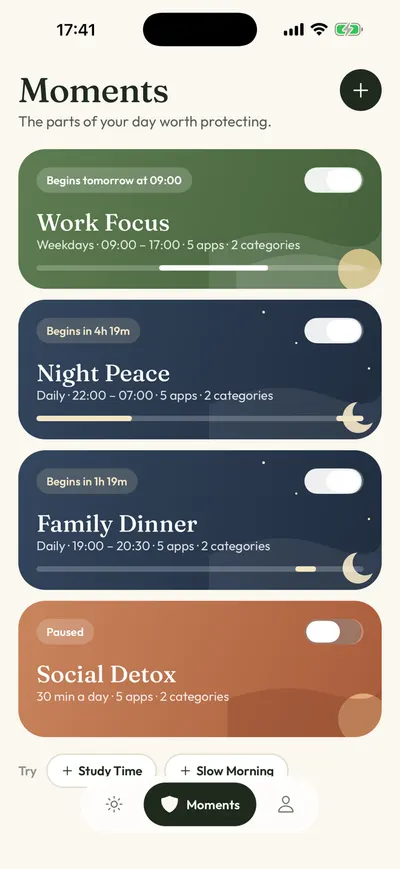
- Set up the replacement. In Calma: allow Screen Time access, pick your apps, then open the Moments tab and tap a suggestion like Night Peace, or tap New moment. Tap each word to set apps, days and times, then tap Protect this moment.
- Move website blocks to Screen Time. Calma is an app blocker. On iOS 26, go to Settings > Screen Time > Content & Privacy Restrictions > App Store, Media, Web, & Games > Web Content, select Limit Adult Websites, then tap Add Website below Never Allow, per Apple’s guide.
FAQ
Is there a free alternative to Freedom on iPhone?
Yes. Apple Screen Time is free and built in, with a Downtime schedule and App Limits. ScreenZen is free and supported by donations, and it also runs on Mac, Windows and Android.
What apps are like Freedom?
Opal, Jomo, ScreenZen and Brick all block distracting apps on iPhone. Opal and Jomo also block websites and have a Mac app. ScreenZen is the free option that also covers Windows.
Does Freedom work on iPhone?
Yes. Freedom has an iOS app that blocks apps through Screen Time permission and websites through a Safari content blocker. Its App Store page lists iOS 16.1 or later.
Can Calma replace Freedom?
Calma can replace Freedom on your iPhone, for apps. Calma runs only on iPhone, so it can’t block your computer, and it is built for apps rather than websites. If you need those, keep Freedom for the laptop, or use Screen Time for sites.
Can I use Freedom and Calma at the same time?
You can install both. Both rely on Apple’s Screen Time access on iPhone, so it is simpler to let one app handle iPhone app blocking and keep Freedom for your computer. That way you always know which rule is blocking an app.
How we compared
We read each app’s pricing page, help center and App Store listing on October 5, 2026, and put the date next to every price. This comparison uses public documentation, not hands-on tests of the other apps. Where an app doesn’t say something publicly, the table says so instead of guessing. For more options, see the best app blockers for iPhone, our one sec alternatives, Clearspace and its alternatives, or the guide on hard blockers vs a gentle pause.
Sources
- Freedom Premium pricing (Monthly $8.99, Yearly shown as $3.33 a month, Forever $199 shown at $99.50 with 50% off), checked 2026-10-05
- Freedom Help Center: What's included in Free and Premium plans, checked 2026-10-05
- Freedom Help Center: Locked Mode, checked 2026-10-05
- Freedom Help Center: Freedom for iOS app options explained, checked 2026-10-05
- Freedom downloads (platforms, browser extension for Chromebook and Linux, Limit app), checked 2026-10-05
- Freedom on the App Store (4.4 from 5,946 US ratings, version 7.17, Oct 5, 2026; in-app purchases also list $12.99 monthly and $59.99 yearly options), checked 2026-10-05
- Opal pricing page, checked 2026-10-05
- Opal website (platforms), checked 2026-10-05
- Opal on the App Store (Deep Focus, leaderboards, apps and websites), checked 2026-10-05
- Jomo pricing, checked 2026-10-05
- Jomo features (Strict Mode, unlock tasks, Mac, websites), checked 2026-10-05
- ScreenZen website ("The only free screen time app for iOS, macOS, Windows and Android", donation-supported), checked 2026-10-05
- ScreenZen on the App Store, checked 2026-10-05
- Brick website (price, modes and schedules), checked 2026-10-05
- Brick FAQ (Emergency Unbricks, platforms), checked 2026-10-05
- Brick on the App Store, checked 2026-10-05
- Apple Support: Set schedules with Screen Time on iPhone (iOS 26), checked 2026-10-05
- Apple Support: Block apps, app downloads, websites, and purchases (iOS 26), checked 2026-10-05
- Apple Support: Cancel a subscription from Apple, checked 2026-10-05
- Calma on the App Store (version 1.2.0, 12 languages, Calma Pro Weekly $3.99, Monthly $9.99 and Yearly $39.99), checked 2026-10-05
Only need your iPhone covered?
Calma blocks the apps you pick at the times you pick, with daily limits and no account. Try it free for 3 days.