7 Jomo alternatives for iPhone in 2026
The best Jomo alternatives for iPhone are Opal if you want a Hard Mode, more stats and an Android app, one sec if you want a pause backed by published research, ScreenZen or Screen Time if you want it free, Clearspace if you want exercise before scrolling, Brick if you want a physical lock, and Calma (our app) if you want apps blocked at set times with no streaks or leaderboards. If a low yearly price, a one-time option and a Mac app matter most, Jomo may still be your best pick.

By AASN Tech · Last verified: · Sources at the end. · How we compare apps
 Free trial · Data stays on your iPhone
In one line: Stay with Jomo for its low yearly price, one-time plan, Mac app and choice of unlock tasks. Switch if you want no streaks or leaderboards, a harder lock, or a simpler setup.
Jomo alternatives compared
Same fields we use on every comparison page. US prices as of Oct 11, 2026.
| Feature | Jomo | Brick | Calma | Clearspace | one sec | Opal | Screen Time | ScreenZen |
|---|---|---|---|---|---|---|---|---|
| Price | $5.99/mo, $29.99/yr or $99.99 once | $59 one-time for the device | $3.99/wk, $9.99/mo or $39.99/yr | $6.99/mo or $44.99/yr | $6.99/mo, $19.99/yr or $99.99 lifetime | $19.99/mo, $99.99/yr or $399 lifetime | Free | Free, optional tips $5 to $40 |
| Free tier | 1 Session, 1 Action or Limit, 1 Screen Time Budget | App included with the Brick | 3-day free trial, then Calma Pro | One app, per Clearspace's launch page | One app | 1 rule with schedule, time limits and open limits | Everything | Everything |
| Blocking style | Blocks at set times, after a limit, or until you take action | Tap a physical Brick to block and unblock | Calm block screen at set times | Breath or exercise before the app opens, then a timed session | Breathing pause before the app opens | Blocks with adjustable difficulty, up to Hard Mode | Downtime schedule and App Limits (Screen Time Schedule and Time Allowances in iOS 27) | Wait before opening, can grow each time |
| Can you end a block early? | Pass an unlock task you pick: wait, give a reason, password, QR code and more. Jomo says Strict Mode (Plus) rules can't be deleted or bypassed | Tap the Brick again, or use 1 of 5 Emergency Unbricks | Scheduled blocks: Back to calm only, switch the rule off in the app. Focus sessions: 3-second hold | Proceed after the pause, or opt out. The session ends when your chosen time runs out | Continue after the pause, or close the app. Pro block sessions can be strict | Easier levels: yes. Hard Mode (Pro): no way out, 1 Emergency Pass a week | Limits can be ignored by default. Block at Downtime makes the schedule stick | Open after the wait. Strict blocks and a settings lock are optional |
| Schedules | Yes | Yes, custom modes and schedules | Yes, overnight and overlapping | Yes | Pro: block sessions and schedules | Yes | Downtime | Yes, by time range |
| Time limits | Yes, Limits and Screen Time Budgets | Not publicly stated | 15 min to 2 h a day | Session length per open, plus daily budgets | Kicks you out after a set time | Yes | App Limits | App goals, with an optional block at the limit |
| Open limits | Daily uses with Locks. The older Open Limits are legacy only | Not publicly stated | 3 to 50 opens a day | Daily number of opens, per App Store reviews | Not publicly stated | Yes | None | Strict block after a number of opens |
| Streaks and gamification | Squads leaderboard, best streak, reports | Focus timer, usage history | None | Streaks, challenges, accountability partners | Progress charts | Opal Score, leaderboards, rewards | Weekly report | Streaks |
| Platforms | iPhone, Mac on the App Store. Jomo's site also lists iPad | iPhone, Android | iPhone | iPhone, Android, Chrome | iPhone, iPad, Mac, Android, browsers | iPhone, Android, Mac | iPhone, iPad, Mac | iPhone, iPad, Mac, Windows, Android |
Who should pick Jomo, and who should pick Calma?
Pick Jomo if
- You want a low yearly price: Jomo Plus is $29.99 a year, or $14.99 a year on the Student plan if you qualify. Only one sec is cheaper here, at $19.99.
- You'd rather pay once: $99.99 buys Jomo Plus for good and can be shared with 5 family members.
- You want the same tool on your Mac, with website and keyword blocking there.
- You like choosing how hard each unlock is, from a short wait to a password or a QR code, and want Strict Mode for the worst apps.
Pick Calma if
- Your slips happen at the same times, like in bed or during work, and you want those hours blocked behind a single Back to calm button.
- You don't want Squads, streaks or reports. Calma shows one figure: time protected today.
- You want open limits built in: 3 to 50 opens a day, 15 minutes per open.
- You want no account and no ads, with rules that stay on your iPhone.
Still not sure which kind of app blocker fits you? Take the 5-question app blocker quiz
Why look for a Jomo alternative?
People usually look for a Jomo alternative because the free plan covers one session, because the strictest features need Jomo Plus, or because they want a simpler blocker without leaderboards and streaks. Jomo (“Jomo - Screen Time Blocker” on the App Store) blocks apps at set times, after a limit, or until you complete an unlock task you choose. It is well rated: 4.8 stars from 2,480 US App Store ratings as of October 11, 2026. The reasons to compare, each with a public source:
- The free plan is small. Jomo’s pricing page lists 1 Session, 1 Action or Limit and 1 Screen Time Budget for free. The annual plan raises that to up to 10 Sessions and 10 Actions or Limits, plus multiple Screen Time Budgets.
- Strict Mode is paid. On the same page, Strict Mode, multiple Screen Time Budgets and Apple Health integration are listed only under the paid plans.
- Open Limits moved to legacy. Jomo’s changelog says version 2.0 (June 2026) replaced the old Open Limits with Locks and kept them only as a legacy option in Advanced mode. Its help article on counting opens says the feature “is no longer supported by Jomo.”
- More to set up and track. Jomo has Sessions, Locks, Limits, Routines, Squads, journaling and reports. Squads is “a leaderboard with family, friends, colleagues, or community,” per Jomo’s blog, and version 2.0 added a best streak to the Profile tab. Some people want a blocker with fewer moving parts.
- The privacy label. On the App Store, Jomo’s developer lists User Content under “Data Used to Track You,” and email address and name among data linked to you. Apple notes this label is supplied by the developer and not checked by Apple.
Jomo vs Opal: which is better?
Jomo is better if you want a lower price, a one-time plan and a choice of unlock tasks. Opal is better if you want more stats, leaderboards and an Android app. Both block apps on a schedule and with daily limits, and both have a Mac app.
| Jomo | Opal | |
|---|---|---|
| Yearly price (US, Oct 11, 2026) | $29.99 | $99.99 |
| Monthly price | $5.99 | $19.99 |
| One-time price | $99.99 | $399 |
| Free plan | 1 Session, 1 Action or Limit, 1 Screen Time Budget | 1 rule with schedule, time limits and open limits |
| Strictest mode | Strict Mode: rules can’t be deleted or bypassed, per Jomo | Hard Mode: “No way out,” with 1 Emergency Pass a week |
| Unlock tasks | Wait, give a reason, recopy a text, password, QR code and more | Breaks that get harder at stricter levels |
| Scores and social | Squads leaderboard, best streak | Opal Score, leaderboards, rewards |
| Platforms | iPhone, Mac (Jomo’s site also lists iPad) | iPhone, Android, Mac |
| US App Store rating (Oct 11, 2026) | 4.8 from 2,480 ratings | 4.7 from 89,556 ratings |
Pick Jomo if you want most of Opal’s job for less than a third of the yearly price. Pick Opal if you need Android or want scores and leaderboards to keep you going. Our Opal alternatives page covers Opal in more depth.
Calma: best if your scrolling happens at set times
We make Calma, so weigh this section with that in mind. Jomo gives you many ways to unlock an app. Calma gives you fewer choices on purpose. You pick the apps and the hours, like weekdays 9 AM to 5 PM or every night 10 PM to 7 AM, and during that window the app shows “Instagram is resting.” with a single Back to calm button. No task gets you past it. If you need the app early, you switch that routine off in Calma.
If you used Jomo’s Open Limits, Calma has open limits built in: 3, 5, 10, 20 or 50 opens a day. While you have opens left, the block screen shows Open app, and each open gives you 15 minutes. Daily time limits run from 15 minutes to 2 hours, and then the app rests until midnight. Focus sessions run 15 to 180 minutes and end early only with a 3-second hold.
Compared with Jomo
- No Squads, streaks or reports. The only number is time protected today.
- No account and no ads. Your rules stay on your iPhone, and Calma’s App Store label lists Usage Data, not linked to you.
- Open limits are a main feature, where Jomo moved its original Open Limits to a legacy option.
- iPhone only and apps only. Jomo also has a Mac app and blocks websites.
- No Strict Mode. Any Calma routine can be switched off in the app.
- No free plan beyond a 3-day trial, no one-time price, and $39.99 a year against Jomo’s $29.99.
Price: $3.99 a week, $9.99 a month or $39.99 a year in the US as of October 11, 2026, after a 3-day free trial. Calma needs iOS 18 or later and is available in 12 languages. Pick it if you know the hours you slip and want them blocked without a menu of settings. More on how Calma’s app blocker works.
Opal: best if you want Hard Mode and more stats
Opal blocks apps and websites with schedules, time limits and open limits, at adjustable difficulty. Its top level, Hard Mode on the pricing page, is described as “No way out. You can’t turn Opal off.” Per Opal’s help center, the exit at the hardest level is one Emergency Pass a week.
Compared with Jomo
- A Hard Mode with one Emergency Pass a week as the exit, if you talk yourself past Jomo’s unlock tasks and don’t use Strict Mode.
- An Android app, which Jomo doesn’t list.
- The Opal Score, reports and leaderboards, if numbers motivate you.
- More than three times the yearly price: $99.99 against $29.99.
Price: $19.99 a month, $99.99 a year or $399 lifetime, as of October 11, 2026. Pick it if you need Android, or want scores and leaderboards on top of a hard lock.
one sec: best Jomo alternative with research behind it
one sec puts a breathing exercise in front of a chosen app, then lets you continue or close it. It is the only app here with a peer-reviewed field study: in the 2023 PNAS paper, one sec cut openings of the target apps by 57% after six weeks. That result is for one sec only.
Compared with Jomo
- Cheaper per year: $19.99 against $29.99.
- More platforms: iPhone, iPad, Mac, Android and browser extensions.
- A pause first, blocks second. Block sessions and schedules are part of one sec pro.
- On iPhone it relies on a Shortcuts automation you set up.
Price: $6.99 a month, $19.99 a year or $99.99 lifetime in the US App Store, as of October 11, 2026. The free version covers one app. Pick it if Jomo’s “Wait a few secs.” unlock was the part that worked for you. See one sec alternatives and Calma vs one sec.
ScreenZen: best free app like Jomo
ScreenZen puts a wait in front of a chosen app, and its App Store listing says the wait can grow each time you open it. It can also strict-block apps “for time ranges, after a certain number of opens or ScreenTime.” It costs nothing: the only in-app purchases are tips from $5 to $40.
Compared with Jomo
- Free for every app, where Jomo’s free plan covers one session and one action or limit.
- Strict blocks after a number of opens, for free.
- It has streaks too, so it won’t help if streaks are what you want to leave behind.
Price: free, tips optional, as of October 11, 2026. Pick it if you hit Jomo’s free-plan wall and don’t want to pay. Our ScreenZen alternatives page goes deeper, and here is how ScreenZen compares with Calma.
Clearspace: best if you want exercise before scrolling
Clearspace asks for a breath or a short exercise, like push-ups or squats, before a chosen app opens, then asks how long you want to stay. It adds challenges and an accountability partner.
Compared with Jomo
- Exercise unlocks like push-ups or squats, where most of Jomo’s are waiting, typing or scanning.
- An Android app and a Chrome extension. No Mac app.
- A pricier yearly plan: $44.99 against $29.99. The free version covers one app.
Price: $6.99 a month or $44.99 a year in the US App Store, as of October 11, 2026. Pick it if moving your body is what stops you. See Clearspace alternatives.
Brick: best if you want the lock outside your phone
Brick swaps Jomo’s software unlock tasks for a physical device. You tap your phone on a small Brick to start blocking, and you need the Brick again to unblock. It supports custom modes and schedules, and gives you five Emergency Unbricks.
Compared with Jomo
- A barrier you can’t pass from the couch, with no subscription.
- iPhone and Android only, no iPad or Mac.
- No time limits or open limits documented.
Price: $59 one-time for the device, as of October 11, 2026. Pick it if Jomo’s Strict Mode still isn’t enough. See Brick alternatives.
Screen Time: best if you’d rather install nothing
Apple’s Screen Time is free and already on your iPhone. In iOS 26 it has a Downtime schedule and daily App Limits. In iOS 27 these are called a Screen Time Schedule and Time Allowances. Apple’s iOS 26 guide is direct about the catch: “By default, Screen Time limits can be ignored once reached.”
Compared with Jomo
- Free, with no extra app or account beyond your Apple Account.
- Can block websites through Content & Privacy Restrictions.
- No unlock tasks, open limits, Squads or Strict Mode. Block at Downtime keeps the schedule from being ignored.
Price: free. Pick it if you mainly used Jomo for one schedule. Our Calma vs Screen Time page has the setup.
Is Jomo still worth it in 2026?
Yes, for many people. Jomo Plus at $29.99 a year is the cheapest yearly plan among the paid blockers here after one sec, and $99.99 once buys it for good, shared with up to 5 family members. A Student plan costs $14.99 a year if you qualify. Jomo runs on iPhone and Mac (its site also lists iPad), blocks websites on all browsers, and lets you choose a different unlock task for each app. It is actively updated: version 2.0.8 shipped on September 25, 2026.
Switch if you want it free (ScreenZen, Screen Time), want a lock that’s harder to talk your way past (Opal’s Hard Mode, Brick), want a studied pause (one sec), or want your worst hours blocked with no streaks and no leaderboard (Calma). Not sure which kind of blocker suits you? Our app blocker quiz asks 5 questions and suggests one.
How to switch from Jomo to Calma
- Delete your Jomo rules first. Jomo’s help center says to “Delete your rules BEFORE deleting the app,” or apps and websites can stay blocked. Strict Mode rules have their own removal steps.
- Cancel Jomo Plus if you subscribed through Apple: Settings > [your name] > Subscriptions, tap Jomo, then Cancel Subscription. A one-time purchase has nothing to cancel.
- Install Calma, allow Screen Time access when iOS asks, and pick the apps in Apple’s app picker.
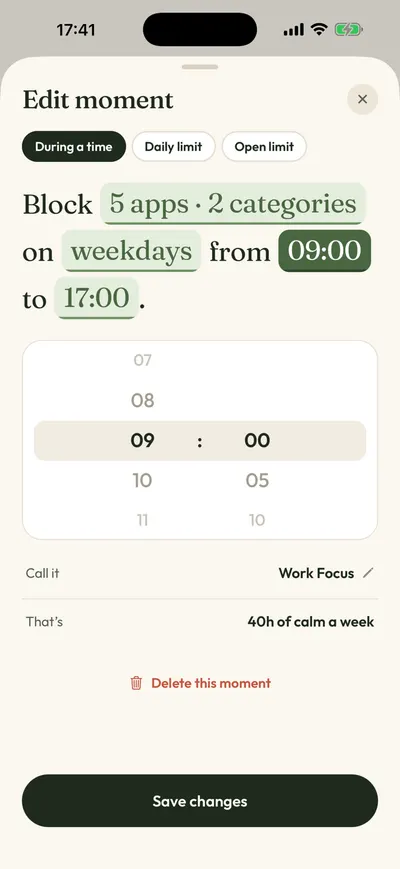
- Open the Moments tab. Tap a ready-made routine like Night Peace (10 PM to 7 AM) or Work Focus, or tap New moment and set your own days and times. For something close to Jomo’s Open Limits, add an open limit such as 5 opens a day.
- Tap Protect this moment. iOS applies the rule on its own from then on, even when Calma is closed.
- Move website blocks to Screen Time. Calma is an app blocker. On iOS 26, go to Settings > Screen Time > Content & Privacy Restrictions, turn on Content & Privacy Restrictions, tap App Store, Media, Web, & Games > Web Content, select Limit Adult Websites, then tap Add Website below Never Allow, per Apple’s guide.
FAQ
Is there a free Jomo alternative?
Yes. ScreenZen is free for every app, with tips as the only purchases. Apple Screen Time is free and built in. Jomo’s own free plan also works if one session and one limit are enough.
Is Jomo better than Opal?
It depends on what you need. Jomo costs $29.99 a year against Opal’s $99.99 and lets you pick an unlock task per app. Opal has Hard Mode with one Emergency Pass a week, an Android app and more stats. Both have a strict mode on their paid plans.
Does Jomo have a lifetime plan?
Yes. Jomo’s pricing page lists a Single Purchase at $99.99, shareable with 5 family members, as of October 11, 2026. The App Store also lists a $84.99 Lifetime option, so check the price shown in the app before you buy.
Does Calma work on Mac or iPad like Jomo?
No. Calma runs on iPhone only and blocks apps, not websites. If you need your Mac covered, Jomo, one sec or Opal fit better, and Freedom covers Windows too. For iPad, one sec lists iPad support on the App Store. Jomo’s site mentions iPad, but its US App Store listing shows only iPhone and Mac.
Can I use Jomo and Calma together?
Yes, on different apps. For example, keep Jomo on your Mac and a Calma bedtime block on TikTok and Instagram. Two blockers on the same app get confusing fast.
How we compared
On October 11, 2026 we checked Jomo’s pricing page, features page, changelog, help center, App Store listing, in-app prices and privacy label. We rechecked Opal, one sec, ScreenZen, Clearspace, Brick and Calma prices the same day; older checks for feature details are dated in the sources. We did not test the other apps hands-on, and “Not publicly stated” means an app doesn’t document that feature. No app paid to be listed. For the wider field, see the best app blockers for iPhone.
Sources
- Jomo pricing (Free plan, Annual $29.99 with 3-day trial, Single Purchase $99.99 shared with 5 family members, Student $14.99 a year), checked 2026-10-11
- Jomo on the App Store (4.8 from 2,480 US ratings, version 2.0.8 of Sep 25, 2026; in-app purchases list Monthly $5.99, Annual $29.99, Lifetime $99.99 and $84.99, Family $11.99 a month and $59.99 a year; App Privacy label), checked 2026-10-11
- Jomo App Store lookup (rating, count, version, description with Jomo Plus prices and website blocking), checked 2026-10-11
- Jomo website ("iPhone, iPad and Mac", while the App Store compatibility lists iPhone and Mac only; blocks at set times, after a limit, or until you take action), checked 2026-10-11
- Jomo features (Sessions, Locks, Limits, Routines, unlock options, Strict Mode, Mac website and keyword blocking), checked 2026-10-11
- Jomo changelog (version 2.0, June 2026: Locks with daily uses, best streak, Open Limits moved to a legacy option), checked 2026-10-11
- Jomo blog (Squads described as a leaderboard with family, friends, colleagues or community), checked 2026-10-11
- Jomo Help Center: Setup an automation to count app opens (legacy, "no longer supported by Jomo"), checked 2026-10-11
- Jomo Help Center: Shortcuts, Focus Modes and Widgets, checked 2026-10-11
- Jomo Help Center: Jomo on Mac (Limits and Actions not available on Mac), checked 2026-10-11
- Jomo Help Center: Estimated Screen Time Is Incorrect, How To Fix It?, checked 2026-10-11
- Jomo Help Center: How to uninstall Jomo (the right way)?, checked 2026-10-11
- Jomo Help Center: How To Manage or Cancel Jomo Plus Subscription? (trial only on the annual plan), checked 2026-10-11
- Jomo App Store reviews, checked 2026-10-11
- Opal pricing page (Free plan, Pro $19.99 a month or $99.99 a year, $399 lifetime, Hard Mode), checked 2026-10-11
- Opal on the App Store (4.7 from 89,556 US ratings, version 4.18 of Oct 5, 2026; Monthly Plan $19.99, Yearly Plan $99.99), checked 2026-10-11
- Opal Help Center: What are sessions? (strictness levels, Emergency Pass), checked 2026-10-11
- one sec on the App Store (in-app purchase prices, compatibility), checked 2026-10-11
- one sec FAQ, checked 2026-09-25
- one sec platforms, checked 2026-09-25
- Grüning, Riedel and Lorenz-Spreen, PNAS 2023: Directing smartphone use through the self-nudge app one sec, checked 2026-10-11
- ScreenZen on the App Store (tips $5 to $40, wait before opening, strict blocks, streaks), checked 2026-10-11
- ScreenZen website ("iOS, macOS, Windows and Android", donation-supported), checked 2026-10-05
- Clearspace on the App Store (in-app purchase prices), checked 2026-10-11
- Clearspace launch page (free for one app, accountability partner), checked 2026-09-28
- Clearspace extension on the Chrome Web Store, checked 2026-09-28
- Brick website (price, modes and schedules, Emergency Unbricks), checked 2026-10-11
- Brick FAQ (platforms, physical device needed to unbrick), checked 2026-09-28
- Apple Support: Set schedules with Screen Time on iPhone (iOS 26), checked 2026-10-11
- Apple Support: Set Screen Time Schedules and Time Allowances (iOS 27), checked 2026-09-28
- Apple Support: Block apps, app downloads, websites, and purchases (iOS 26), checked 2026-10-11
- Calma on the App Store (App Blocker & Detox: Calma; Calma Pro Weekly $3.99, Monthly $9.99, Yearly $39.99; iOS 18.0 or later; 12 languages), checked 2026-10-11
Want fewer settings and no leaderboard?
Calma blocks the apps you pick during the hours you pick, like 10 PM to 7 AM, with daily limits and open limits. No streaks, no account. Try it free for 3 days.